Search the Community
Showing results for tags 'builder'.
Found 6 results
-

Version 1.0.0
1 download
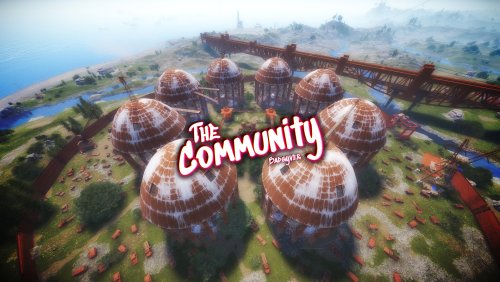
Now you will have a Rust style space for your clan, group or game team. The community is a circular space with several construction zones for your base or house. Surrounded by a large wall which offers a defense for your team. The community offers a decorative space for your Rust server, junkyard style.$12.90 -
View File The Community Now you will have a Rust style space for your clan, group or game team. The community is a circular space with several construction zones for your base or house. Surrounded by a large wall which offers a defense for your team. The community offers a decorative space for your Rust server, junkyard style. Submitter BADGYVER Submitted 08/12/23 Category Prefabs
-
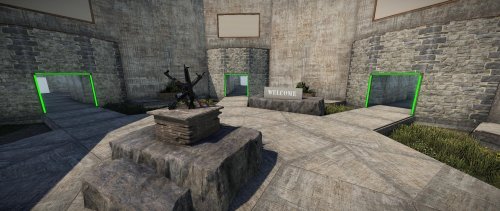
View File Aimtrain DIY Kit Do you want to create or start your own Aimtrain server, or just like to add a custom PVP arena or Bot training arena to your map? Here is an easier way to design and customize your own arenas. KEY FEATURES: ARENA DESIGNERS - Easy to install with predefined Height, Splat and Road Spawn settings included. - Various included placeable prefabs to add to your arenas, or you can design any of your own. - Various sizes available. All arenas includes a spectator glass box for players to watch the events. + Round shaped arenas: 50M, 75M, 100M, 125M, 150M and 200M. + Square shaped arenas: 100M, 200M, 300M and a Glass Cage design of 300M (Great for minicopter flight combat) - A Natural set of a River designed arena for the classic open-combat. SPAWN LOBBY - Enclosed with a beautiful cliff edge, and surrounded by grass landscape. - 6 Arena rooms, each with 5 arena entrances. - Signs to advertise your Arenas, or for your sponsors. - 3 pre-set Spawn Points for players joining your server. (Requires Oxide.Ext.RustEdit.dll file to be installed.) - Easy to adjust or customize your Lobby further from within RustEdit. SAMPLE MAP A sample 4500 map is included, pre designed with various arena sizes to get you started. PLEASE NOTE: This package is only the prefabs to create arenas for your map, you will still need to use a Game Manager or Event Management plugin. If you need help, have problems, or for any questions, please feel free to join my Discord or DM me, gpsmit84#5963. Thank you very much for your time and have a great day. Submitter gpsmit84 Submitted 02/15/2022 Category Prefabs
-
Version 1.01
0 downloads
Do you want to create or start your own Aimtrain server, or just like to add a custom PVP arena or Bot training arena to your map? Here is an easier way to design and customize your own arenas. KEY FEATURES: ARENA DESIGNERS - Easy to install with predefined Height, Splat and Road Spawn settings included. - Various included placeable prefabs to add to your arenas, or you can design any of your own. - Various sizes available. All arenas includes a spectator glass box for players to watch the events. + Round shaped arenas: 50M, 75M, 100M, 125M, 150M and 200M. + Square shaped arenas: 100M, 200M, 300M and a Glass Cage design of 300M (Great for minicopter flight combat) - A Natural set of a River designed arena for the classic open-combat. SPAWN LOBBY - Enclosed with a beautiful cliff edge, and surrounded by grass landscape. - 6 Arena rooms, each with 5 arena entrances. - Signs to advertise your Arenas, or for your sponsors. - 3 pre-set Spawn Points for players joining your server. (Requires Oxide.Ext.RustEdit.dll file to be installed.) - Easy to adjust or customize your Lobby further from within RustEdit. SAMPLE MAP A sample 4500 map is included, pre designed with various arena sizes to get you started. PLEASE NOTE: This package is only the prefabs to create arenas for your map, you will still need to use a Game Manager or Event Management plugin. If you need help, have problems, or for any questions, please feel free to join my Discord or DM me, gpsmit84#5963. Thank you very much for your time and have a great day.$9.99 -
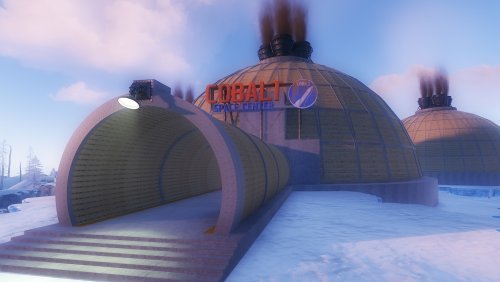
View File Build Zone Dome Players will be able to build inside this dome. Build Zone Dome is a safe dome for players to build inside. It contains a door that you can open and close, as well as its own lighting and vertical signs to draw on. Submitter BADGYVER Submitted 08/27/2023 Category Prefabs
-
Version 1.0.0
0 downloads
Players will be able to build inside this dome. Build Zone Dome is a safe dome for players to build inside. It contains a door that you can open and close, as well as its own lighting and vertical signs to draw on.$5.40