

urbanviking21
Developer
-
Joined
-
Last visited
Everything posted by urbanviking21
-
View File RoastBot (killfeed) RoastBot Adds a little fun to the chat by roasting players on their death. Will also count deaths and causes. Add your own mockery notes in the config Add or remove death comments in the config file default config { "DeathComments": { "bullet": [ "{player} ate a bullet sandwich! That’s {causeDeaths} times you’ve been a target dummy!", "..." ], "fall": [ "{player} forgot how gravity works! {causeDeaths} falls in {totalDeaths} deaths!", "..." ], "animal": [ "{player} became animal chow! {causeDeaths} times animals won!", "{player} lost to wildlife again. {causeDeaths} animal deaths in {totalDeaths}!", "{player} thought they were a zookeeper. {causeDeaths} maulings say otherwise!", "Another animal snack for {player}! That’s {causeDeaths} furry defeats!", "{player} keeps feeding the wildlife. {causeDeaths} times in {totalDeaths} deaths!" ], "explosion": [ "{player} went BOOM! {causeDeaths} explosions in {totalDeaths} deaths!", "..." ], "melee": [ "{player} got whacked! {causeDeaths} melee beatdowns in {totalDeaths} deaths!", "..." ], "drowned": [ "{player} forgot how to swim! {causeDeaths} drownings in {totalDeaths} deaths!", "..." ], "suicide": [ "{player} checked out early! {causeDeaths} self-inflicted exits in {totalDeaths} deaths!", "..." ], "cold": [ "{player} turned into a popsicle! {causeDeaths} freezes in {totalDeaths} deaths!", "..." ], "heat": [ "{player} melted in the heat! {causeDeaths} heatstrokes in {totalDeaths} deaths!", "..." ], "starvation": [ "{player} starved to death! {causeDeaths} times you forgot to eat!", "..." ], "burn": [ "{player} went up in flames! {causeDeaths} times you’ve been toasted!", "..." ], "other": [ "{player} died mysteriously! {causeDeaths} weird deaths in {totalDeaths}!", "..." ] }, "ShowDeathNotes": true } Submitter urbanviking21 Submitted 05/14/2025 Category Plugins
-
 RoastBot Adds a little fun to the chat by roasting players on their death. Will also count deaths and causes. Add your own mockery notes in the config Add or remove death comments in the config file default config { "DeathComments": { "bullet": [ "{player} ate a bullet sandwich! That’s {causeDeaths} times you’ve been a target dummy!", "..." ], "fall": [ "{player} forgot how gravity works! {causeDeaths} falls in {totalDeaths} deaths!", "..." ], "animal": [ "{player} became animal chow! {causeDeaths} times animals won!", "{player} lost to wildlife again. {causeDeaths} animal deaths in {totalDeaths}!", "{player} thought they were a zookeeper. {causeDeaths} maulings say otherwise!", "Another animal snack for {player}! That’s {causeDeaths} furry defeats!", "{player} keeps feeding the wildlife. {causeDeaths} times in {totalDeaths} deaths!" ], "explosion": [ "{player} went BOOM! {causeDeaths} explosions in {totalDeaths} deaths!", "..." ], "melee": [ "{player} got whacked! {causeDeaths} melee beatdowns in {totalDeaths} deaths!", "..." ], "drowned": [ "{player} forgot how to swim! {causeDeaths} drownings in {totalDeaths} deaths!", "..." ], "suicide": [ "{player} checked out early! {causeDeaths} self-inflicted exits in {totalDeaths} deaths!", "..." ], "cold": [ "{player} turned into a popsicle! {causeDeaths} freezes in {totalDeaths} deaths!", "..." ], "heat": [ "{player} melted in the heat! {causeDeaths} heatstrokes in {totalDeaths} deaths!", "..." ], "starvation": [ "{player} starved to death! {causeDeaths} times you forgot to eat!", "..." ], "burn": [ "{player} went up in flames! {causeDeaths} times you’ve been toasted!", "..." ], "other": [ "{player} died mysteriously! {causeDeaths} weird deaths in {totalDeaths}!", "..." ] }, "ShowDeathNotes": true }$4.99
 -
View File Warehouse Outpost (bandit/outpost/stables) Jungle Edition Updated version of the warehouse outpost for the jungle Combined Outpost/Bandit and Stables. A static travelling vendor. Player trade area. 4 recyclers. Water catcher. Oil refinery. Airwolf spawner. Submitter urbanviking21 Submitted 05/09/2025 Category Monuments
-
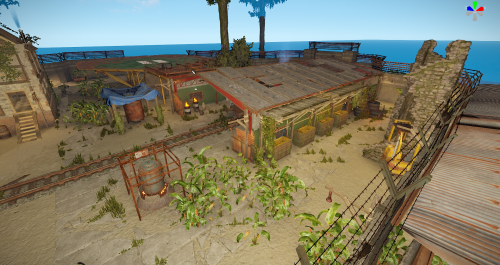 Updated version of the warehouse outpost for the jungle Combined Outpost/Bandit and Stables. A static travelling vendor. Player trade area. 4 recyclers. Water catcher. Oil refinery. Airwolf spawner.$5.99
 -
 Outpost with some Jungle additions$2.99
 -
View File Soul Collector Bringing a bit of Skyrim to Rust Soul collectors. Collect souls and fill soul gems as you kill NPC's 3 stages to each crystal, upon filling a crystal you can upgrade it to a soul token and then again to a cursed skull. Permissions soulcollector.use - Allows players to use SoulCollector items and collect souls. soulcollector.admin - Grants access to admin commands (/givecrystal, /givetoken, /giveskull, /reloadconfig). Works very well with the following 3 plugins Viper Crafting or Custom Mixing and Commands Item https://codefling.com/plugins/custom-mixing https://codefling.com/plugins/viper-crafting https://codefling.com/plugins/commands-item Submitter urbanviking21 Submitted 04/22/2025 Category Plugins
-
View File Bradley Factory About Bradley Factory Bradley Factory large standalone monument featuring 3 working card rooms. Monument requires 3 fuses to complete. Features NPCS at entrances and around the compound and the buildings. Bradley patrols the compound. 2 hackable crates, plenty of military, elite and standard crates. This monument is made up of around 900 prefabs. Lighting and doors electrics all work. features: Green, Blue and Red card rooms Bradley APC NPCS Lots of loot crates Size: 225 Submitter urbanviking21 Submitted 04/20/2025 Category Monuments
-
View File FreshMeat Instantly switches spoiled meat for FreshMeat permission - freshmeat.use Submitter urbanviking21 Submitted 04/20/2025 Category Plugins
-
View File Group Link (oxide group parenting) About GroupLink (oxide group parenting) GroupLink is a lightweight Rust plugin designed for the Oxide modding framework, created to manage group relationships between leader (parent) groups and their associated subgroups. Its primary function is to automatically remove players from specified subgroups when they are no longer part of their corresponding leader group, ensuring that subgroup permissions are tied to leader group membership. This is particularly useful for servers using timed or subscription-based group systems, such as those managed by the TimedPermissions plugin. When a player loses membership in a leader group (either through manual removal or expiration via TimedPermissions), GroupLink checks for and removes them from all linked subgroups defined in its configuration. Upon each subgroup removal, it sends a private, customizable chat message to the affected player, informing them of the change. The plugin uses a periodic check system to ensure compatibility with external group management plugins, making it efficient with minimal server performance impact. Key features: Automatically removes players from subgroups when their leader group membership ends Sends private, styled chat messages (configurable size and color) to affected players Lightweight design with deferred operations using NextTick to reduce resource usage Configurable leader groups, subgroups, message format, and check interval Admin commands for testing and debugging group status Configuration Explanation The plugin generates a configuration file named GroupLink in the oxide/config directory. Below is the default configuration with an explanation of each field: json { "LeaderGroups": [ "vipplus", "mvp", "fanatic" ], "SubGroups": { "vipplus": [ "cvipplusbuilders", "cvipplusfarmers", "cvipplusindustrial" ], "mvp": [ "bmvpbuilders", "bmvpfarmers", "bmvpindustrial" ], "fanatic": [ "afanaticbuilders", "afanaticfarmers", "afanaticindustrial" ] }, "MessageFormat": "{0} you have left group {1} as your {2} subscription has ended", "MessageSize": 24, "MessageColor": "green", "CheckInterval": 60.0 } LeaderGroups: An array of strings listing the parent group names (e.g., "vipplus", "mvp", "fanatic"). These are the primary groups that, when removed from a player, trigger subgroup removal. SubGroups: A dictionary mapping each leader group to an array of its associated subgroups. For example, "vipplus" is linked to "cvipplusbuilders", "cvipplusfarmers", and "cvipplusindustrial". When a player loses the leader group, they are removed from all listed subgroups. MessageFormat: A string defining the chat message sent to players upon subgroup removal. It uses indexed placeholders: {0}: Player's username {1}: Subgroup name {2}: Leader group name Example output: "UrbanViking you have left group bmvpbuilders as your mvp subscription has ended" MessageSize: An integer setting the font size of the chat message (default: 24). MessageColor: A string defining the color of the chat message in HTML color format (default: "green"). Can be changed to other colors like "red", "#FF0000", etc. CheckInterval: A float specifying how often (in seconds) the plugin checks all connected players for leader group status (default: 60.0). Adjust this to balance responsiveness and server load. Adding/Removing Groups from the Config To modify the groups in the config, edit oxide/config/GroupLink.json and reload the plugin using oxide.reload GroupLink or /grouplink reload. Here's how to add or remove groups: Adding a New Leader Group and Subgroups Open GroupLink.json. In the "LeaderGroups" array, add the new leader group name: json "LeaderGroups": [ "vipplus", "mvp", "fanatic", "elite" // Added new leader group ] In the "SubGroups" dictionary, add a new entry for the leader group with its subgroups: json "SubGroups": { "vipplus": ["cvipplusbuilders", "cvipplusfarmers", "cvipplusindustrial"], "mvp": ["bmvpbuilders", "bmvpfarmers", "bmvpindustrial"], "fanatic": ["afanaticbuilders", "afanaticfarmers", "afanaticindustrial"], "elite": ["elitebuilders", "elitefarmers", "eliteindustrial"] // Added subgroups for "elite" } Save the file and reload the plugin. Removing a Leader Group and Its Subgroups Open GroupLink.json. In the "LeaderGroups" array, remove the leader group name: "LeaderGroups": [ "vipplus", "fanatic" // Removed "mvp" ] In the "SubGroups" dictionary, remove the corresponding entry: "SubGroups": { "vipplus": ["cvipplusbuilders", "cvipplusfarmers", "cvipplusindustrial"], "fanatic": ["afanaticbuilders", "afanaticfarmers", "afanaticindustrial"] // Removed "mvp" entry } Save the file and reload the plugin. Adding/Removing Subgroups for an Existing Leader Group To add a subgroup, append it to the array under the leader group in "SubGroups": "mvp": ["bmvpbuilders", "bmvpfarmers", "bmvpindustrial", "mvpraiders"] // Added "mvpraiders" To remove a subgroup, delete it from the array: "mvp": ["bmvpbuilders", "bmvpfarmers"] // Removed "bmvpindustrial" Save and reload the plugin. Hooks Needed by Other Plugins GroupLink uses the following Oxide hook, which other plugins might need to interact with or be aware of: OnUserGroupRemoved(BasePlayer player, string group): Called when a player is removed from a group via Oxide's permission system. GroupLink uses this as a fallback to catch manual group removals, though its primary mechanism is a periodic check for TimedPermissions compatibility. Other plugins can call this hook to trigger GroupLink's removal logic if they remove players from leader groups manually. Submitter urbanviking21 Submitted 04/20/2025 Category Plugins
-
View File Cargo Crash Cargo crash Cargo crash site is primarily designed for PVE/PVP servers. Providing an offshore PVP zone. However it also has features suitable for PVE Red card access to the lower deck housing 2 hackable crates. Top deck has NPC guards and another 2 hackable crates. This site is made up off approx 680 parts. This site will be consistently updated. Size of the prefab is 300. Medium radiation level across the whole area. This is designed to be placed into the ocean of your map. oxide rustedit extension is needed for the io connections on this site to be used https://github.com/k1lly0u/Oxide.Ext.RustEdit/blob/master/README.md Submitter urbanviking21 Submitted 04/20/2025 Category Monuments
-
View File Warehouse Outpost (bandit/outpost/stables) About Warehouse Outpost (bandit/outpost/stables) Bring together Outpost, Bandit Camp and Stables to one safe zone. All mission providers are located, all outpost vending machines added, stables to the side, added house for use with quests or the offering or whatever you would like to use it for. Bandit shopkeepers have been placed however I cannot figure out how to make them work in game. probably missing something my end when testing. Plenty of lighting for night time. Includes 4 recyclers Caboose train and all gambling options Big wheel Oil refinery T1 workbench Research table Repair bench Heli pad for landing as well as placing your airwolf Drone Marketplace Barbecue and seating for comfort Large watercatcher No frame loss when testing on my own server. No glitchy overlaps. All vending machines working as they should. I have included screenshots from both RustEdit and in game. prefab count before grouping was around 600 I have included a testmap featuring only this outpost for testing before implementing onto your own maps. Submitter urbanviking21 Submitted 04/20/2025 Category Monuments
-
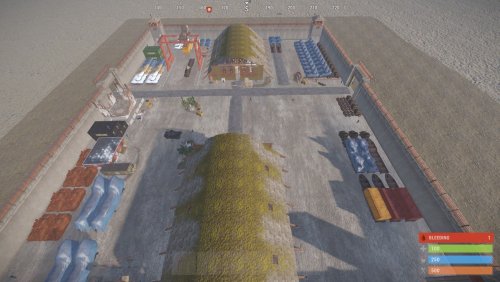 About Bradley Factory Bradley Factory large standalone monument featuring 3 working card rooms. Monument requires 3 fuses to complete. Features NPCS at entrances and around the compound and the buildings. Bradley patrols the compound. 2 hackable crates, plenty of military, elite and standard crates. This monument is made up of around 900 prefabs. Lighting and doors electrics all work. features: Green, Blue and Red card rooms Bradley APC NPCS Lots of loot crates Size: 225Free
 -
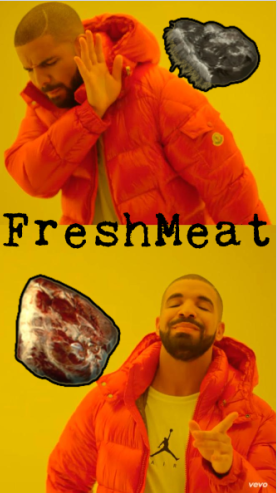 Instantly switches spoiled meat for FreshMeat permission - freshmeat.use$5
 -
 About GroupLink (oxide group parenting) GroupLink is a lightweight Rust plugin designed for the Oxide modding framework, created to manage group relationships between leader (parent) groups and their associated subgroups. Its primary function is to automatically remove players from specified subgroups when they are no longer part of their corresponding leader group, ensuring that subgroup permissions are tied to leader group membership. This is particularly useful for servers using timed or subscription-based group systems, such as those managed by the TimedPermissions plugin. When a player loses membership in a leader group (either through manual removal or expiration via TimedPermissions), GroupLink checks for and removes them from all linked subgroups defined in its configuration. Upon each subgroup removal, it sends a private, customizable chat message to the affected player, informing them of the change. The plugin uses a periodic check system to ensure compatibility with external group management plugins, making it efficient with minimal server performance impact. Key features: Automatically removes players from subgroups when their leader group membership ends Sends private, styled chat messages (configurable size and color) to affected players Lightweight design with deferred operations using NextTick to reduce resource usage Configurable leader groups, subgroups, message format, and check interval Admin commands for testing and debugging group status Configuration Explanation The plugin generates a configuration file named GroupLink in the oxide/config directory. Below is the default configuration with an explanation of each field: json { "LeaderGroups": [ "vipplus", "mvp", "fanatic" ], "SubGroups": { "vipplus": [ "cvipplusbuilders", "cvipplusfarmers", "cvipplusindustrial" ], "mvp": [ "bmvpbuilders", "bmvpfarmers", "bmvpindustrial" ], "fanatic": [ "afanaticbuilders", "afanaticfarmers", "afanaticindustrial" ] }, "MessageFormat": "{0} you have left group {1} as your {2} subscription has ended", "MessageSize": 24, "MessageColor": "green", "CheckInterval": 60.0 } LeaderGroups: An array of strings listing the parent group names (e.g., "vipplus", "mvp", "fanatic"). These are the primary groups that, when removed from a player, trigger subgroup removal. SubGroups: A dictionary mapping each leader group to an array of its associated subgroups. For example, "vipplus" is linked to "cvipplusbuilders", "cvipplusfarmers", and "cvipplusindustrial". When a player loses the leader group, they are removed from all listed subgroups. MessageFormat: A string defining the chat message sent to players upon subgroup removal. It uses indexed placeholders: {0}: Player's username {1}: Subgroup name {2}: Leader group name Example output: "UrbanViking you have left group bmvpbuilders as your mvp subscription has ended" MessageSize: An integer setting the font size of the chat message (default: 24). MessageColor: A string defining the color of the chat message in HTML color format (default: "green"). Can be changed to other colors like "red", "#FF0000", etc. CheckInterval: A float specifying how often (in seconds) the plugin checks all connected players for leader group status (default: 60.0). Adjust this to balance responsiveness and server load. Adding/Removing Groups from the Config To modify the groups in the config, edit oxide/config/GroupLink.json and reload the plugin using oxide.reload GroupLink or /grouplink reload. Here's how to add or remove groups: Adding a New Leader Group and Subgroups Open GroupLink.json. In the "LeaderGroups" array, add the new leader group name: json "LeaderGroups": [ "vipplus", "mvp", "fanatic", "elite" // Added new leader group ] In the "SubGroups" dictionary, add a new entry for the leader group with its subgroups: json "SubGroups": { "vipplus": ["cvipplusbuilders", "cvipplusfarmers", "cvipplusindustrial"], "mvp": ["bmvpbuilders", "bmvpfarmers", "bmvpindustrial"], "fanatic": ["afanaticbuilders", "afanaticfarmers", "afanaticindustrial"], "elite": ["elitebuilders", "elitefarmers", "eliteindustrial"] // Added subgroups for "elite" } Save the file and reload the plugin. Removing a Leader Group and Its Subgroups Open GroupLink.json. In the "LeaderGroups" array, remove the leader group name: "LeaderGroups": [ "vipplus", "fanatic" // Removed "mvp" ] In the "SubGroups" dictionary, remove the corresponding entry: "SubGroups": { "vipplus": ["cvipplusbuilders", "cvipplusfarmers", "cvipplusindustrial"], "fanatic": ["afanaticbuilders", "afanaticfarmers", "afanaticindustrial"] // Removed "mvp" entry } Save the file and reload the plugin. Adding/Removing Subgroups for an Existing Leader Group To add a subgroup, append it to the array under the leader group in "SubGroups": "mvp": ["bmvpbuilders", "bmvpfarmers", "bmvpindustrial", "mvpraiders"] // Added "mvpraiders" To remove a subgroup, delete it from the array: "mvp": ["bmvpbuilders", "bmvpfarmers"] // Removed "bmvpindustrial" Save and reload the plugin. Hooks Needed by Other Plugins GroupLink uses the following Oxide hook, which other plugins might need to interact with or be aware of: OnUserGroupRemoved(BasePlayer player, string group): Called when a player is removed from a group via Oxide's permission system. GroupLink uses this as a fallback to catch manual group removals, though its primary mechanism is a periodic check for TimedPermissions compatibility. Other plugins can call this hook to trigger GroupLink's removal logic if they remove players from leader groups manually.$5
 -
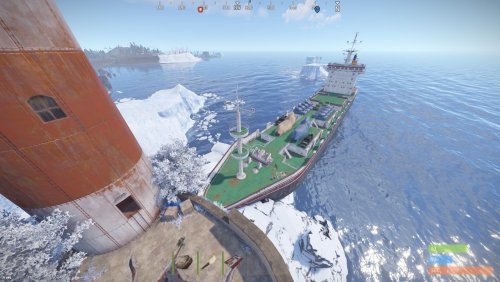 Cargo crash Cargo crash site is primarily designed for PVE/PVP servers. Providing an offshore PVP zone. However it also has features suitable for PVE Red card access to the lower deck housing 2 hackable crates. Top deck has NPC guards and another 2 hackable crates. This site is made up off approx 680 parts. This site will be consistently updated. Size of the prefab is 300. Medium radiation level across the whole area. This is designed to be placed into the ocean of your map. oxide rustedit extension is needed for the io connections on this site to be used https://github.com/k1lly0u/Oxide.Ext.RustEdit/blob/master/README.md$5
 -
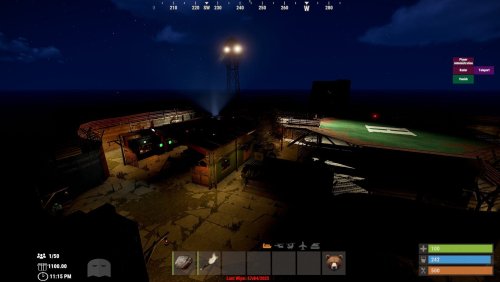 About Warehouse Outpost (bandit/outpost/stables) Bring together Outpost, Bandit Camp and Stables to one safe zone. All mission providers are located, all outpost vending machines added, stables to the side, added house for use with quests or the offering or whatever you would like to use it for. Bandit shopkeepers have been placed however I cannot figure out how to make them work in game. probably missing something my end when testing. Plenty of lighting for night time. Includes 4 recyclers Caboose train and all gambling options Big wheel Oil refinery T1 workbench Research table Repair bench Heli pad for landing as well as placing your airwolf Drone Marketplace Barbecue and seating for comfort Large watercatcher No frame loss when testing on my own server. No glitchy overlaps. All vending machines working as they should. I have included screenshots from both RustEdit and in game. prefab count before grouping was around 600 I have included a testmap featuring only this outpost for testing before implementing onto your own maps.$5