



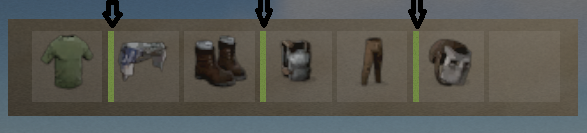
This plugin allows NPC to not only deal damage to the on hit player, but also reduce the durability of equipped armor.
Currently, the plugin randomly selects from the available equipped armor what has durability and reduces this value when it hits the player.
The perfect plugin for Hardcore servers to keep players from stockpiling a lot of items.
The plugin only processes items that have a durability scale.
Reduces armor durability for each item that is listed in the config file.
Permission, for the plugin to work = "armornotforever.use";
Permission, armor will take damage such as player = "armornotforever.damagetotal";
Permission, armor will take damage as you set = "armornotforever.damagemultiplier";
Permission, armor does not take damage = "armornotforever.damagebypass";
If the player has "armornotforever.damagetotal" permission.
This means the settings from the "Multiplier settings" list will not be taken into account and the armor with a probability (50/50) will be damaged such as the player receives.
If the player has "armornotforever.damagemultiplier" permission.
This means if in the settings "attire.hide.poncho": 1.0,
then the poncho has a (50/50) chance of taking 1 damage.
If the player has "armornotforever.damagebypass" permission.
This means that the player's armor will not take damage.
I also want to draw attention to the fact that if you test the plugin in god mode, then the armor will not take damage.
In the "Global settings" there is an item "Debag" by turning it on you will see in the server console what item and what damage is done to the player's armor.
Default the config file.
{
  "Global settings": {
    "Debag": true,
    "Damage from (Suicide). Does not damage armor.": false,
    "Damage from (Bleeding). Does not damage armor.": false,
    "Damage from (Drowning). Does not damage armor.": false,
    "Damage from (Thirst). Does not damage armor.": false,
    "Damage from (Hunger). Does not damage armor.": false,
    "Damage from (Cold). Does not damage armor.": false,
    "Damage from (Heat). Does not damage armor.": false,
    "Damage from (Fall). Does not damage armor.": false,
    "Damage from (Radiation). Does not damage armor.": false
  },
  "Multiplier settings": {
    "Item list Head (item shortname : multiplier)": {
      "metal.facemask": 1.0,
      "diving.mask": 1.0,
      "hat.gas.mask": 1.0,
      "heavy.plate.helmet": 1.0,
      "bucket.helmet": 1.0,
      "wood.armor.helmet": 1.0,
      "sunglasses": 1.0,
      "twitchsunglasses": 1.0,
      "riot.helmet": 1.0,
      "coffeecan.helmet": 1.0,
      "deer.skull.mask": 1.0
    },
    "Item list Body (item shortname : multiplier)": {
      "hazmatsuit": 1.0,
      "hazmatsuit.arcticsuit": 1.0,
      "hazmatsuit.nomadsuit": 1.0,
      "hazmatsuit.spacesuit": 1.0,
      "heavy.plate.jacket": 1.0,
      "metal.plate.torso": 1.0,
      "roadsign.jacket": 1.0,
      "bone.armor.suit": 1.0,
      "wood.armor.jacket": 1.0,
      "attire.hide.poncho": 1.0,
      "jumpsuit.suit": 1.0,
      "jumpsuit.suit.blue": 1.0,
      "cratecostume": 1.0,
      "barrelcostume": 1.0,
      "gloweyes": 1.0
    },
    "Item list Pants (item shortname : multiplier)": {
      "heavy.plate.pants": 1.0,
      "wood.armor.pants": 1.0,
      "roadsign.kilt": 1.0
    }
  }
}
to deal in the Software without restriction, including without limitation the rights to use, copy, modify, merge, publish, distribute, sublicense,
and/or sell copies of the Software, and to permit persons to whom the Software is furnished to do so, subject to the following conditions:
The above copyright notice and this permission notice shall be included in all copies or substantial portions of the Software.
THE SOFTWARE IS PROVIDED "AS IS", WITHOUT WARRANTY OF ANY KIND, EXPRESS OR IMPLIED, INCLUDING BUT NOT LIMITED TO THE WARRANTIES OF MERCHANTABILITY,
FITNESS FOR A PARTICULAR PURPOSE AND NONINFRINGEMENT. IN NO EVENT SHALL THE AUTHORS OR COPYRIGHT HOLDERS BE LIABLE FOR ANY CLAIM, DAMAGES OR OTHER LIABILITY,
WHETHER IN AN ACTION OF CONTRACT, TORT OR OTHERWISE, ARISING FROM, OUT OF OR IN CONNECTION WITH THE SOFTWARE OR THE USE OR OTHER DEALINGS IN THE SOFTWARE.
-
 1
1
You may only provide a review once you have downloaded the file.