



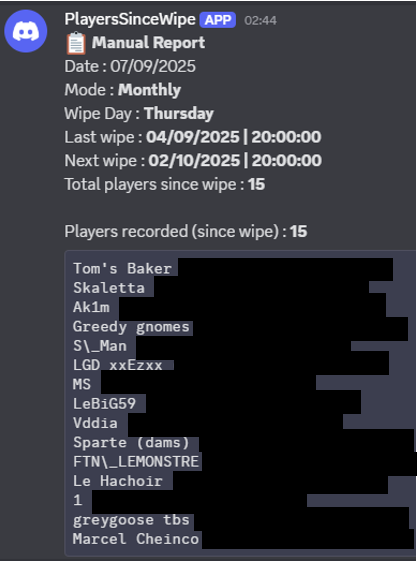
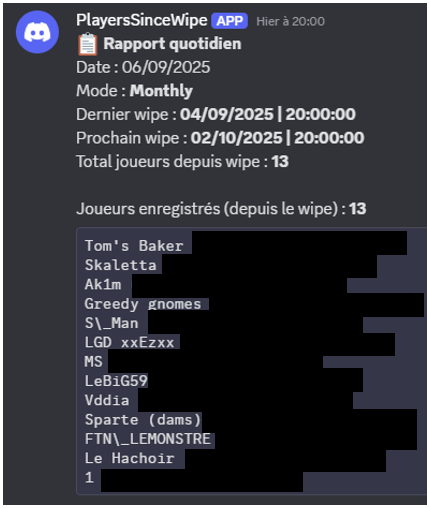
PlayersSinceWipe is a powerful Rust plugin designed to track every player who connects to the server after the plugin is installed, starting from the last wipe.
It supports multiple wipe modes and can automatically send daily or manual reports to Discord via webhook.
Previous player connections before installation are not tracked.
Key Features:
-
Automatic tracking of all players since the last wipe.
-
Support for Monthly, Weekly, and BiWeekly wipe modes.
-
Daily automated reports with full player lists and statistics.
-
Manual report system for both chat and console.
-
Full Discord integration through webhook.
-
Multi-language support (French / English) with customizable messages.
Commands:
-
/psw.report→ Sends a manual report to Discord from in-game chat. -
psw.report(console) → Sends a manual report from the server console.
Benefits:
-
Accurate and fully automated player tracking with zero manual effort.
-
Simple setup and seamless integration with Rust and Discord.
-
Fully compatible with all Rust servers running Oxide or Carbon.
Configuration file:
Citation{
"Configurable timezone (ex: Europe/Paris, Europe/London, America/New_York, UTC)": "Europe/Paris",
"Daily report send time (HH:mm, 24h format)": "20:00",
"Discord Wipe Report Webhook URL": "https://discord.com/api/webhooks/",
"Wipe Day - Options: Monday to Sunday": "Thursday",
"Wipe Mode - Options: Monthly, Weekly, BiWeekly": "Monthly",
"Wipe Time (HH:mm, 24h format)": "20:00"
}
Edited by Noryx
What's New in Version 1.0.1
Released
Update of the description file :
Track every player who connects to the server after the plugin is installed, starting from the last wipe.
Previous player connections before installation are not tracked
Devoloper: Aero70
You may not copy, modify, merge, publish, distribute, sublicense, or sell copies of This Software without the Developer’s consent
THIS SOFTWARE IS PROVIDED BY THE COPYRIGHT HOLDERS AND CONTRIBUTORS "AS IS" AND ANY EXPRESS OR IMPLIED WARRANTIES, INCLUDING, BUT NOT LIMITED TO,
THE IMPLIED WARRANTIES OF MERCHANTABILITY AND FITNESS FOR A PARTICULAR PURPOSE ARE DISCLAIMED. IN NO EVENT SHALL THE COPYRIGHT HOLDER OR CONTRIBUTORS
BE LIABLE FOR ANY DIRECT, INDIRECT, INCIDENTAL, SPECIAL, EXEMPLARY, OR CONSEQUENTIAL DAMAGES (INCLUDING, BUT NOT LIMITED TO, PROCUREMENT OF SUBSTITUTE
GOODS OR SERVICES; LOSS OF USE, DATA, OR PROFITS; OR BUSINESS INTERRUPTION) HOWEVER CAUSED AND ON ANY THEORY OF LIABILITY, WHETHER IN CONTRACT, STRICT
LIABILITY, OR TORT (INCLUDING NEGLIGENCE OR OTHERWISE) ARISING IN ANY WAY OUT OF THE USE OF THIS SOFTWARE, EVEN IF ADVISED OF THE POSSIBILITY OF SUCH DAMAGE.
You may only provide a review once you have downloaded the file.
There are no reviews to display.