



47 files
-
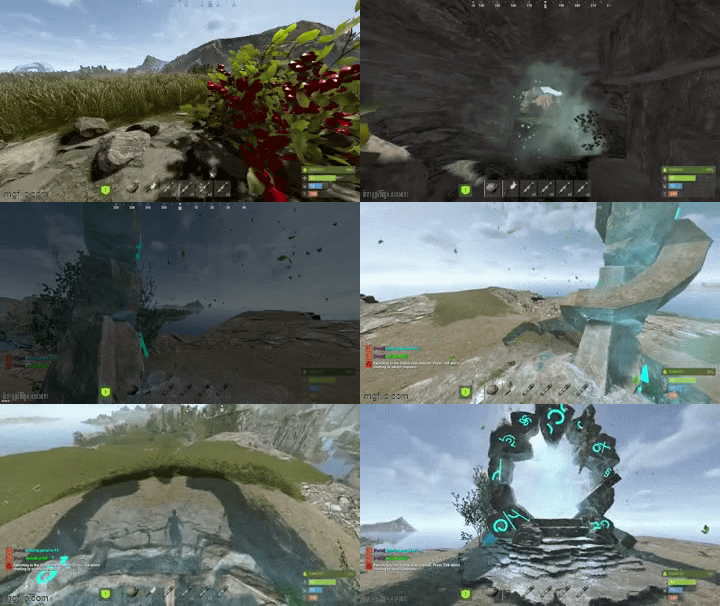
AdvancedPortals is a portal system for Rust with a clean UI, visual portal spheres, effect presets, and an admin panel for managing everything in-game.
Create portals with multiple entry/exit points, allow bi-directional or one-way travel, optionally require permissions per-portal, and customize the entire experience with effects, sounds, cooldowns, delays, and messages.
What it does?
Create unlimited portals with multiple entry & exit points
Supports one-way or two-way portals
Optional permission locking per portal
Polished player UI (/portals) to browse available portals
Full Admin UI panel (/portaladmin) to manage portals + settings
Visual portal spheres using Rust’s built-in sphere entity
Effect presets (mystical / fire / electric / silent etc.)
Entry/exit messages + teleport sound
Cooldown + optional teleport delay
Auto wipes portal data when the map changes (seed/size/new save)
Ambient portal effects (optional, timed)
Permissions :
Global permissions
advancedportals.use
Allows players to use portals and open the portal UI.
advancedportals.admin
Allows access to all admin commands and the admin panel.
Per-portal permissions (auto-generated)
If a portal has Requires Permission enabled, the plugin will generate a permission like:
advancedportals.use.<portal_name>
Example:
Portal display name: "Outpost Portal"
Permission becomes:
advancedportals.use.outpost_portal
Commands :
Player Commands :
/portals
Opens the portals list UI (only shows portals you have permission to use)
Admin Commands :
/portal
Shows help + usage
/portal create <name>
Creates a new portal
/portal delete <name>
Deletes a portal and all its points
/portal list
Lists all portals and their entry/exit counts
/addportalentry <portalname>
Adds an entry point at your current location
/addportalexit <portalname>
Adds an exit point at your current location
Admin UI
Portal Controls
Enable / Disable portals
Toggle One-Way / Two-Way
Toggle Requires Permission
Toggle portal sphere visibility
Add entry / exit points
Clear all entries / exits
Teleport to a portal for testing
Delete portals
Select effect preset per portal
Page through portals list
Settings Controls
Toggle global portal sphere visuals
Toggle effects on/off
Toggle enter message / exit message
Toggle combat restrictions
View cooldown/delay/radius values (edit in config)
How portals work ?
Each portal can have:
Entry Points (where players enter)
Exit Points (where players appear)
When a player touches a portal entry sphere:
The plugin picks a random exit point
Teleports the player
Plays optional effects + messages
One-Way behavior
If One Way = true:
Entry points work normally
Exit points do not teleport players back
Config :
{ "Teleport Cooldown (seconds)": 3.0, "Teleport Delay (seconds)": 0.0, "Sphere Radius": 1.5, "Sphere Entity Count (visuals)": 3, "Show Sphere Visuals": true, "Use Portal Effects": true, "Show Enter Message": true, "Show Exit Message": true, "Enter Message": "<color=#9b59b6>[Portal]</color> <color=#00ffff>Entering portal to {destination}...</color>", "Exit Message": "<color=#9b59b6>[Portal]</color> <color=#00ff00>Arrived at {destination}!</color>", "Effect Prefab (entry)": "assets/prefabs/misc/orebonus/effects/bonus_hit.prefab", "Effect Prefab (exit)": "assets/prefabs/misc/orebonus/effects/bonus_hit.prefab", "Teleport Sound": "assets/prefabs/misc/orebonus/effects/bonus_hit.prefab", "Ambient Effect Prefab": "", "Ambient Effect Interval (seconds)": 10.0, "Custom Prefab Path (empty = use sphere)": "", "Block Teleport In Combat": false, "Available Effect Presets": { "mystical": { "Name": "Mystical", "Ambient Effect": "", "Entry Effect": "assets/prefabs/misc/orebonus/effects/bonus_hit.prefab", "Exit Effect": "assets/prefabs/misc/orebonus/effects/bonus_hit.prefab" }, "fire": { "Name": "Fire", "Ambient Effect": "", "Entry Effect": "assets/bundled/prefabs/fx/impacts/additive/fire.prefab", "Exit Effect": "assets/bundled/prefabs/fx/impacts/additive/fire.prefab" }, "nature": { "Name": "Nature", "Ambient Effect": "", "Entry Effect": "assets/prefabs/misc/orebonus/effects/bonus_hit.prefab", "Exit Effect": "assets/prefabs/misc/orebonus/effects/bonus_hit.prefab" }, "electric": { "Name": "Electric", "Ambient Effect": "", "Entry Effect": "assets/prefabs/locks/keypad/effects/lock.code.unlock.prefab", "Exit Effect": "assets/prefabs/locks/keypad/effects/lock.code.unlock.prefab" }, "silent": { "Name": "Silent", "Ambient Effect": "", "Entry Effect": "", "Exit Effect": "" } } }- $12
- 6 Downloads
-
AdvancedTeleport is an all-in-one teleportation system designed for modern Rust servers.
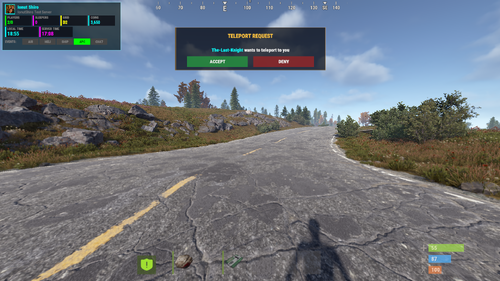
Homes, TPR, warps, outpost/bandit teleports — all wrapped in a clean UI with VIP tiers and admin tools.
Unlike basic teleporter plugins, AdvancedTeleport focuses on server control, balance, and player experience.
Features
Homes with limits, cooldowns & warmups
TPR request system with accept/deny UI
Customizable VIP tiers
Outpost & Bandit teleports (auto-detect OR custom coords)
Fully configurable warp locations
Daily usage limits
Combat / raid / building-blocked restrictions
Economy support: Scrap/ServerRewards/Economics
Admin panel (no config editing needed)
Auto-wipe detection resets teleport data safely
Clean, modern UI players understand instantly
Commands :
Description
/home
Open homes UI / teleport to a home
/sethome <name>
Save a home
/delhome <name>
Delete a home
/homes
Show homes UI
/tpr <player>
Request teleport to player
/tpa
Accept a TPR
/tpc
Cancel/decline pending teleport
/outpost
Teleport to Outpost (if allowed)
/bandit
Teleport to Bandit Camp
/warp <name>
Warp to location
/warps
Open warp list UI
Admin Commands :
Description
/tpadmin
Open admin GUI
/setcoord
Save coordinates during setup wizard
Permissions :
Purpose
advancedteleport.use
Basic teleport features
advancedteleport.admin
Full admin panel & tools
advancedteleport.vip1
VIP Tier 1
advancedteleport.vip2
VIP Tier 2
advancedteleport.vip3
VIP Tier 3
advancedteleport.outpost
Use Outpost teleport
advancedteleport.bandit
Use Bandit teleport
advancedteleport.warp
Use warps
Config :
{ "Request Timeout (seconds)": 30, "Teleport Sound Effect": "assets/prefabs/missions/effects/mission_victory.prefab", "Block Teleport In Combat": true, "Block Teleport When Raiding": true, "Block Teleport When Building Blocked": true, "Require TC Authorization For Home": true, "Use Economics": false, "Use ServerRewards": false, "Use Scrap": false, "Outpost Settings": { "Enabled": true, "Auto Detect Location": true, "Display Name": "Outpost", "Asset Filter (for auto-detect)": "compound", "Custom X": 0.0, "Custom Y": 0.0, "Custom Z": 0.0 }, "Bandit Camp Settings": { "Enabled": true, "Auto Detect Location": true, "Display Name": "Bandit Camp", "Asset Filter (for auto-detect)": "bandit", "Custom X": 0.0, "Custom Y": 0.0, "Custom Z": 0.0 }, "Custom Warp Locations": { "lobby": { "Enabled": true, "Display Name": "Lobby", "X": 1355.97791, "Y": 10.4623671, "Z": 567.7058, "Permission (leave empty for default warp permission)": "" } }, "Permission Tiers": { "default": { "Display Name": "Default", "Max Homes": 2, "Home Cooldown (seconds)": 300, "Home Warmup (seconds)": 10, "Home Cost": 0, "TPR Cooldown (seconds)": 300, "TPR Warmup (seconds)": 10, "TPR Cost": 0, "Daily Home Limit (-1 = unlimited)": 10, "Daily TPR Limit (-1 = unlimited)": 10, "Outpost Cooldown (seconds)": 300, "Outpost Warmup (seconds)": 10, "Outpost Cost": 0, "Bandit Cooldown (seconds)": 300, "Bandit Warmup (seconds)": 10, "Bandit Cost": 0, "Warp Cooldown (seconds)": 300, "Warp Warmup (seconds)": 10, "Warp Cost": 0, "Daily Outpost Limit (-1 = unlimited)": 5, "Daily Bandit Limit (-1 = unlimited)": 5, "Daily Warp Limit (-1 = unlimited)": 10 }, "vip1": { "Display Name": "VIP Bronze", "Max Homes": 4, "Home Cooldown (seconds)": 180, "Home Warmup (seconds)": 7, "Home Cost": 0, "TPR Cooldown (seconds)": 180, "TPR Warmup (seconds)": 7, "TPR Cost": 0, "Daily Home Limit (-1 = unlimited)": 20, "Daily TPR Limit (-1 = unlimited)": 20, "Outpost Cooldown (seconds)": 300, "Outpost Warmup (seconds)": 10, "Outpost Cost": 0, "Bandit Cooldown (seconds)": 300, "Bandit Warmup (seconds)": 10, "Bandit Cost": 0, "Warp Cooldown (seconds)": 300, "Warp Warmup (seconds)": 10, "Warp Cost": 0, "Daily Outpost Limit (-1 = unlimited)": 5, "Daily Bandit Limit (-1 = unlimited)": 5, "Daily Warp Limit (-1 = unlimited)": 10 }, "vip2": { "Display Name": "VIP Silver", "Max Homes": 6, "Home Cooldown (seconds)": 90, "Home Warmup (seconds)": 5, "Home Cost": 0, "TPR Cooldown (seconds)": 90, "TPR Warmup (seconds)": 5, "TPR Cost": 0, "Daily Home Limit (-1 = unlimited)": 35, "Daily TPR Limit (-1 = unlimited)": 35, "Outpost Cooldown (seconds)": 300, "Outpost Warmup (seconds)": 10, "Outpost Cost": 0, "Bandit Cooldown (seconds)": 300, "Bandit Warmup (seconds)": 10, "Bandit Cost": 0, "Warp Cooldown (seconds)": 300, "Warp Warmup (seconds)": 10, "Warp Cost": 0, "Daily Outpost Limit (-1 = unlimited)": 5, "Daily Bandit Limit (-1 = unlimited)": 5, "Daily Warp Limit (-1 = unlimited)": 10 }, "vip3": { "Display Name": "VIP Gold", "Max Homes": 10, "Home Cooldown (seconds)": 30, "Home Warmup (seconds)": 3, "Home Cost": 0, "TPR Cooldown (seconds)": 30, "TPR Warmup (seconds)": 3, "TPR Cost": 0, "Daily Home Limit (-1 = unlimited)": -1, "Daily TPR Limit (-1 = unlimited)": -1, "Outpost Cooldown (seconds)": 300, "Outpost Warmup (seconds)": 10, "Outpost Cost": 0, "Bandit Cooldown (seconds)": 300, "Bandit Warmup (seconds)": 10, "Bandit Cost": 0, "Warp Cooldown (seconds)": 300, "Warp Warmup (seconds)": 10, "Warp Cost": 0, "Daily Outpost Limit (-1 = unlimited)": 5, "Daily Bandit Limit (-1 = unlimited)": 5, "Daily Warp Limit (-1 = unlimited)": 10 } } }- $15
- 15 Downloads
-
Welcome Player gives your players a warm, modern first impression — without being annoying or spammy.
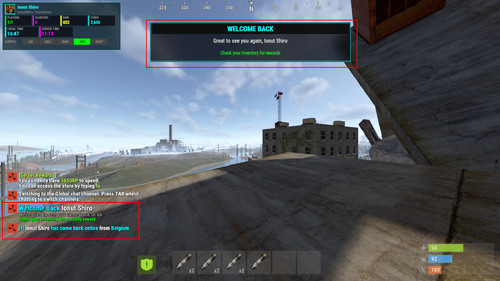
The plugin automatically detects whether someone is joining for the first time or coming back, then shows customized messages, optional rewards, a clean UI banner, and (if you want) sends notifications straight to Discord. It also tracks connection history, so players can check when they first joined and how often they’ve played.
What it does ?
Detects first-time vs returning players
Sends configurable private messages, global join messages (optional), and disconnect messages
Gives custom rewards (with skin support)
Displays a subtle, polished UI welcome banner
Detects player country (with fallback)
Sends Discord webhook embeds for joins and disconnects
Tracks basic player stats (first join, last join, total connects)
Integrates with BetterChat if installed
Supports multiple languages using Oxide lang
And yes — everything can be turned on or off.
Examples (default behavior)
First time player joins → welcome message, optional starter reward, UI banner, optional Discord notification
Returning player joins → short “welcome back” message, optional loyalty reward
Player disconnects → optional global message + Discord embed
Player runs /welcomestats → sees their join history + country + total connections
Permissions :
welcomeplayer.bypass - Skips all welcome events — useful for admins and test accounts.
Commands :
/welcomestats sees their join history + country + total connections
welcomeplayer.reset <steamid|all> - Console Command
welcomeplayer.stats - Console Command
Config :
{ "First Time Player Settings": { "Enable First Time Welcome": true, "Send Global Message": true, "Private Message": "<size=18><color=#00ffff>Welcome</color> <color=#FFFFFF>{player}</color> to <color=#ff00ff>{server}</color></size>\n<size=14><color=#888888>It seems like this is your <color=#00ffff>first time</color> joining us</color></size>\n<size=12><color=#00ff00>Check your inventory for a welcome gift</color></size>", "Global Message": "<size=14><color=#00ff00>[+]</color> <color=#FFFFFF>{player}</color> <color=#00ff00>has joined us for the first time</color> from <color=#00ffff>{country}</color></size>", "Sound Effect": "assets/bundled/prefabs/fx/invite_notice.prefab", "Rewards (shortname:amount:skinId)": [ "syringe.medical:3:0", "bandage:5:0", "apple:10:0", "syringe.medical:3:0", "bandage:5:0", "apple:10:0" ], "Message Display Duration (seconds)": 10.0 }, "Returning Player Settings": { "Enable Returning Player Welcome": true, "Send Global Message": true, "Private Message": "<size=18><color=#00ffff>Welcome Back</color> <color=#FFFFFF>{player}</color></size>\n<size=14><color=#888888>We're glad to see you came back to us</color></size>\n<size=12><color=#00ff00>Check your inventory for a loyalty reward</color></size>", "Global Message": "<size=14><color=#00ffff>[+]</color> <color=#FFFFFF>{player}</color> <color=#00ffff>has come back online</color> from <color=#00ffff>{country}</color></size>", "Sound Effect": "assets/bundled/prefabs/fx/notice/loot.copy.fx.prefab", "Rewards (shortname:amount:skinId)": [ "syringe.medical:1:0", "syringe.medical:1:0" ], "Message Display Duration (seconds)": 8.0 }, "Disconnect Settings": { "Enable Disconnect Message": true, "Send Global Message": true, "Global Message": "<size=14><color=#ff00ff>[-]</color> <color=#FFFFFF>{player}</color> <color=#ff00ff>just went offline</color></size>" }, "General Settings": { "Server Name (leave empty to use server hostname)": "", "Use IP-API for Country Detection": true, "Default Country (if detection fails)": "Unknown", "Welcome Delay (seconds after connect)": 2.0, "Show UI Welcome Banner": true, "UI Banner Duration (seconds)": 8.0, "Log Player Connections": true }, "Discord Webhook Settings": { "Enable Discord Webhooks": false, "Webhook URL": "", "Embed Color - First Time (decimal)": 65280, "Embed Color - Returning (decimal)": 65535, "Embed Color - Disconnect (decimal)": 16711935, "Send First Time Join": true, "First Time Message": ":green_circle: **{player}** has joined for the first time from **{country}**", "Send Returning Player Join": true, "Returning Message": ":blue_circle: **{player}** has come back online from **{country}**", "Send Disconnect": true, "Disconnect Message": ":red_circle: **{player}** just went offline", "Include Player Steam ID": true, "Include Timestamp": true } }- $5
- 6 Downloads
-
Monthly Rewards Calendar gives your players a reason to come back every day — without feeling grindy or pay-to-win.
The plugin shows a clean monthly calendar UI, lets players claim daily rewards, tracks streaks, and even announces milestones. Admins get a full in-game editor, so you can change rewards instantly — no JSON editing or server reload required.
It also supports Discord announcements, custom commands, blueprints, skins, streak bonuses, and full month preview mode.
What it does ?
Detects when players are eligible for a daily reward
Shows a polished calendar UI with claimed, available, and locked rewards
Supports streak bonuses with configurable multipliers and caps
Lets players preview rewards for every month
Tracks claim history, streaks, and total rewards earned
Allows per-month reward tables (fully customizable)
Supports command-based rewards (economy, kits, VIP, etc.)
Integrates item icons via ImageLibrary
Announces streak milestones to Discord (optional)
Includes a full admin editor UI for live reward editing
Supports rotational mode or fixed calendar rewards
And yes — almost every feature can be toggled or tweaked.
Permissions :
Commands :
Config ( Comes with all months/days just shortened here as example ):
{ "Claim Cooldown (hours)": 24, "Show Streak Bonus": true, "Streak Bonus Multiplier Per Day": 0.1, "Max Streak Bonus": 2.0, "Reset Streak On Miss (false = streak only counts claim days)": true, "Use Calendar Day Rewards (true = Day 1 always gives slot 1, false = rotational)": true, "Command Aliases": [ "rewards", "daily", "calendar" ], "Sound Effect On Claim": "assets/prefabs/misc/halloween/lootbag/effects/gold_open.prefab", "UI Cooldown (seconds)": 1.0, "Discord Webhook URL": "", "Discord Announce Milestones (streak counts)": [ 7, 14, 30 ], "Monthly Rewards": { "1": { "Month Name": "January", "Rewards": [ { "Item Shortname": "wood", "Display Name": "Wood", "Amount": 2500, "Skin ID": 0, "Is Blueprint": false, "Custom Command": "" }, { "Item Shortname": "stones", "Display Name": "Stone", "Amount": 2000, "Skin ID": 0, "Is Blueprint": false, "Custom Command": "" } ] }, "2": { "Month Name": "February", "Rewards": [ { "Item Shortname": "scrap", "Display Name": "Scrap", "Amount": 150, "Skin ID": 0, "Is Blueprint": false, "Custom Command": "" } ] } } }- $20
-
Gametip Soundalert offers the Admin a small Plugin to Broadcast a Gametip to all Players.Every Player will also get a notification Sound.
The Plugins plays the Effect "Team Invitation" when you send a Gametip.
Can be used from your Server Console (works with Schedule/TImedEvents) or Ingame with Permission:
effecttimer.use Timer Command
effecttimer TipLength Tip Text to Send Example
effecttimer 10 This is a Test Tip This will send a Tip for 10 Seconds and poke all Players with a Invitation Sound.
No Config Required
- Free
- 12 Downloads
-
Protect your loot! This is the best plugin to protect your Storage Boxes, Research Table, Repair Bench, Furnace, Large Furnace, ETC! Anything that is a placeable storage object, in or around your base from being looted, or picked up! Super optimized at under 80 lines of code! With Team feature!
You can only pick up or loot an object if you are the original owner of the object, or you are authorized on the tool cupboard, or if teams is enabled the owner of the object is in your team/You in their team!
Permissions:
lootguard.bypass - Bypass the protection restrictions!
Configuration:
Language:
- $5
- 12 Downloads
-
Ever wanted to make SAMSites shoot at the Patrol Helicopter or any other vehicles/entities? Well you can with SAM Site Targets, Config is easy and simple, use https://github.com/OrangeWulf/Rust-Docs/blob/master/Entities.md to find the entities shortprefabname, and change the config and bam!
Notes:
Unfortunately the default targeting vehicles like the minicopter are hardcoded in the samsite code, so if u change the targeting range to under 150 it wont work as the hardcoded value takes over...
If you have the permission set to "", it would make it so all SAMSites attack that entity, bypassing the entity owner check!
Configuration:
{ "Entities": { "attackhelicopter.entity": { "Can be targeted by static SAM Sites?": true, "Enabled": false, "Permission": "samsitetargets.attackhelicopter", "Rocket damage multiplier!": 1.0, "Rocket speed multiplier!": 1.0, "Seconds between rocket bursts!": 5.0, "Targeting range!": 150.0 }, "bradleyapc": { "Can be targeted by static SAM Sites?": true, "Enabled": false, "Permission": "samsitetargets.bradley", "Rocket damage multiplier!": 1.0, "Rocket speed multiplier!": 1.0, "Seconds between rocket bursts!": 5.0, "Targeting range!": 150.0 }, "ch47.entity": { "Can be targeted by static SAM Sites?": true, "Enabled": false, "Permission": "samsitetargets.ch47", "Rocket damage multiplier!": 1.0, "Rocket speed multiplier!": 1.0, "Seconds between rocket bursts!": 5.0, "Targeting range!": 150.0 }, "minicopter.entity": { "Can be targeted by static SAM Sites?": true, "Enabled": false, "Permission": "samsitetargets.minicopter", "Rocket damage multiplier!": 1.0, "Rocket speed multiplier!": 1.0, "Seconds between rocket bursts!": 5.0, "Targeting range!": 150.0 }, "patrolhelicopter": { "Can be targeted by static SAM Sites?": true, "Enabled": false, "Permission": "samsitetargets.patrolheli", "Rocket damage multiplier!": 1.0, "Rocket speed multiplier!": 1.0, "Seconds between rocket bursts!": 5.0, "Targeting range!": 150.0 }, "scraptransporthelicopter": { "Can be targeted by static SAM Sites?": true, "Enabled": false, "Permission": "samsitetargets.scrapheli", "Rocket damage multiplier!": 1.0, "Rocket speed multiplier!": 1.0, "Seconds between rocket bursts!": 5.0, "Targeting range!": 150.0 } } }- $10
- 10 Downloads
-
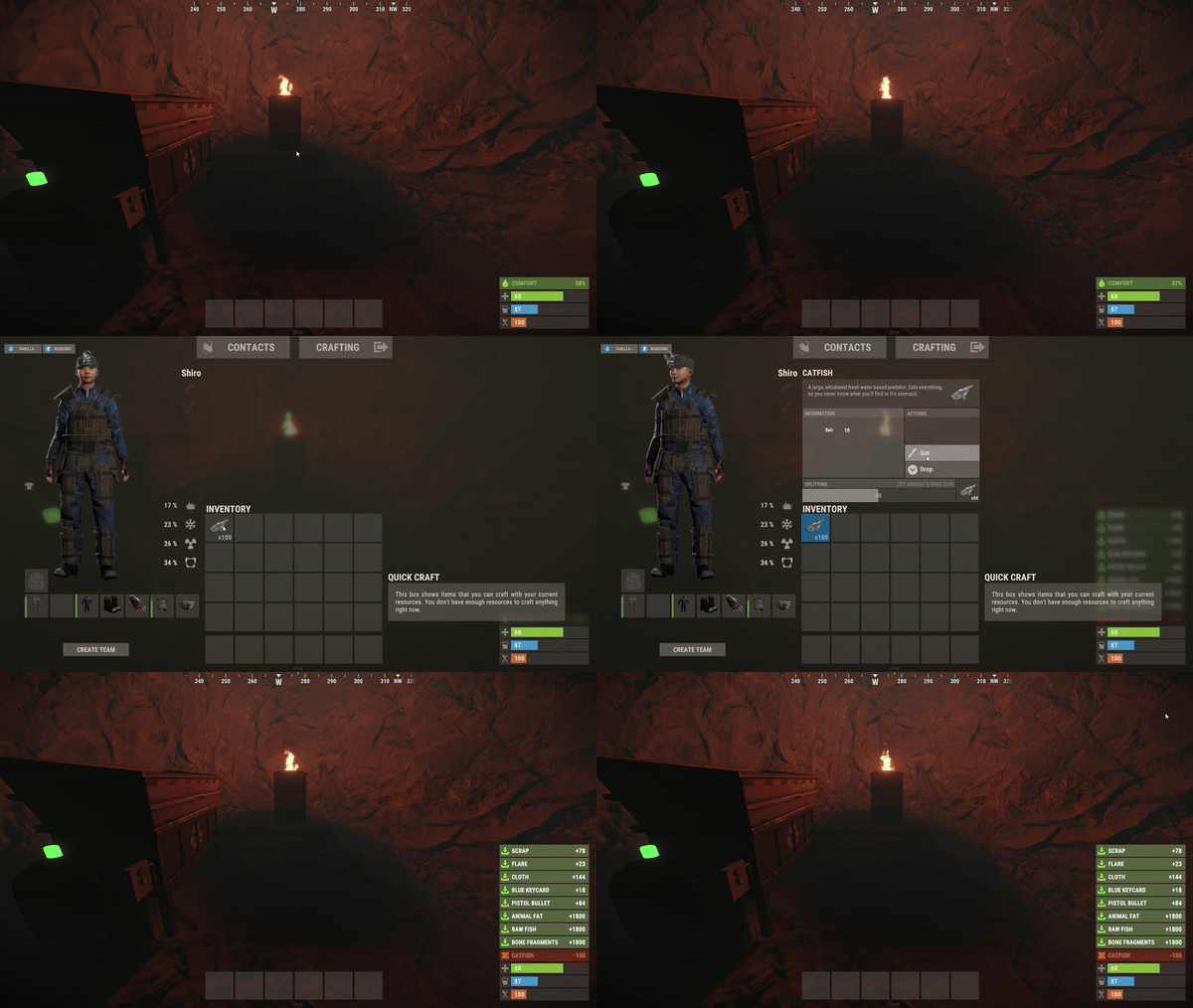
Do you want to make your players lives easier? QuickGut allows your players to gut stacks of fish instantly! Saving time and making them happy!
Plugin is simple and straight forward with no configuration!
Note:
By default quickgut wont be enabled for the player, they ether need to enter the command /gut to enable it or you need to give them the permission quickgut.active when given access... Permissions:
quickgut.use - Allows the player to use the command /gut and allows them to gut fish instantly! quickgut.active - Toggle weather the player has quickgut enabled or not! Commands:
/gut - Toggles the feature on or off!- $5
- 1 Downloads
-
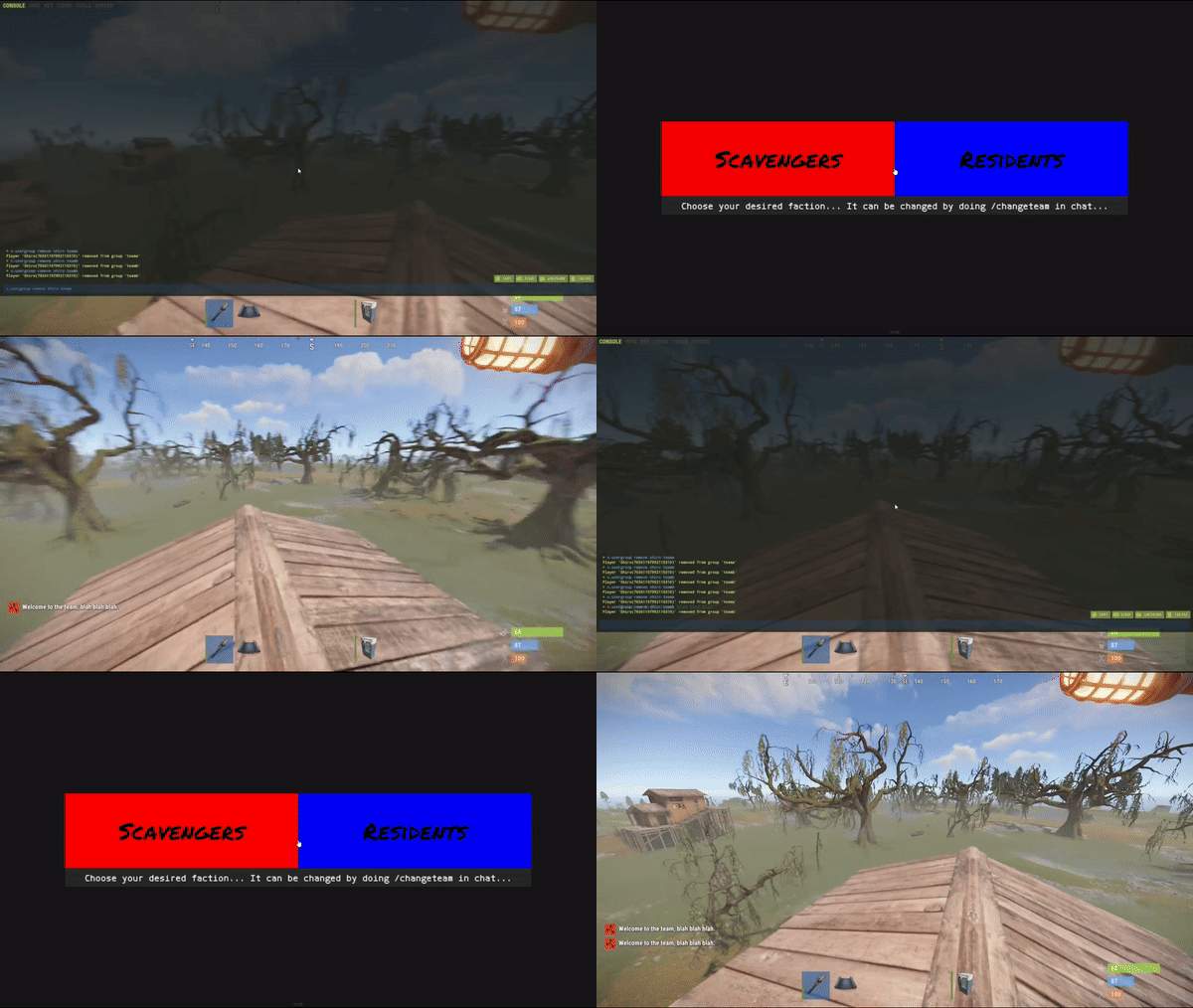
Simple system allows players to choose which team/side/faction or group they want to be in.
On first load you will have to create your own oxide groups for the players to chose from example "Team A/ Team B" you can easily rename those from lang file to example "Scavangers/Residents" or whatever you want.
The purpouse of this plugin is for PVE/Roleplay servers with different types of perks for different types of oxide groups or Event Servers where players can chose their sides.
Permissions:
TeamMenu.change - Allows you to use the command /changeteam Commands:
/changeteam API:
bool ForceChangeTeam (string id) string GetPlayerTeam (string id) string[] GetTeamMembers (string Team) int? GetTeamCount (string Team) Configuration:
{ "onLoad": true, "onAwake": true, "Confirmation_Message": false, "AutoShow_TeamRemoval": true, "TeamA": { "Group": "teama", "Color": "1 0 0 1" }, "TeamB": { "Group": "teamb", "Color": "0 0 1 1" } } Language:
{ "UI_Description": "Choose your desired faction... It can be changed by doing /changeteam in chat...", "Confirmation_Message": "Welcome to the team, blah blah blah.", "TeamA": "TeamA", "TeamB": "TeamB" }
- $5
- 1 Downloads
-
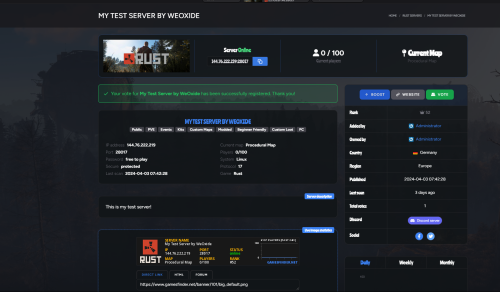
GFVoter it's a voting rewards system for Rust servers listed on GamesFinder.net.
It's designed to reward players for voting for your server/s on gamesfinder.net and players earn points by doing so which they can then redeem for in-game rewards.
What is GamesFinder.net? It's a new platform designed for server owners to list and describe their servers better with more options and gives the players the ability to search for a server easier tailored to their needs and get rewards by voting the server.
Features:
Vote Tracking: Players can vote for the server on the website, and their votes are tracked. Rewards: Players can exchange their accumulated points for rewards. Rewards can be items and executed commands or kits. Cooldown Management: Ensures players can't spam vote claims by implementing a cooldown system. Vote Verification: Checks if a player has voted and then claims their reward via the API. Custom Commands: Players can check their points, claim rewards, or view available rewards through chat commands. Discord Integration: Option to send notifications to a Discord server when a vote is made or a reward is claimed. Commands :
gfvote "Amount" "PlayerName or SteamID" : Allows admins to manually add points to players (Console Command). /claimpoint or /clp : Used by players to claim their voting points. /rewardlist or /rl : Displays available rewards to players. /claimreward or /cr : Players use this to claim a specific reward. /checkpoints or /checkp : Check the amount of points earned. Config Example :
{ "Use discord webhook at vote": true, "Use discord webhook at claim": true, "Discord webhook": "Your discord server webhook", "Chat command to claim reward point": [ "claimpoint", "clp" ], "Chat command for check rewards": [ "rewardlist", "rl" ], "Chat command for get reward": [ "claimreward", "cr" ], "Chat commands for checking points": [ "checkpoints", "checkp" ], "GamesFinder API": "Your API from gamesfinder.net", "Rewards": { "economics": { "Display name for chat (if empty - use key or item name)": "x50 Economics", "NeedPoints": 3, "Type": 1, "Item": null, "Command (%STEAMID% - player user id)": "deposit %STEAMID% 50" }, "group": { "Display name for chat (if empty - use key or item name)": "x1 Group 'Member'", "NeedPoints": 10, "Type": 1, "Item": null, "Command (%STEAMID% - player user id)": "oxide.grant user %STEAMID% (Permission)" }, "sr": { "Display name for chat (if empty - use key or item name)": "x10 ServerRewards", "NeedPoints": 2, "Type": 1, "Item": null, "Command (%STEAMID% - player user id)": "sr add %STEAMID% 10" }, "wood": { "Display name for chat (if empty - use key or item name)": null, "NeedPoints": 1, "Type": 0, "Item": { "Shortname": "wood", "Amount": 1000, "SkinID": 0 }, "Command (%STEAMID% - player user id)": null } }, "Reminder message": "Hey! Don't forget to vote for our server on gamesfinder.net and claim your points.", "Reminder interval minutes": 15 }
- Free
- 8 Downloads