

Skip to content
View in the app

A better way to browse. Learn more.

WeOxide Marketplace ¬ Rust Custom Maps ¬ Prefabs ¬ Monuments and Plugins Free & Paid Assets

A full-screen app on your home screen with push notifications, badges and more.

To install this app on iOS and iPadOS
  1. Tap the Share icon in Safari
  2. Scroll the menu and tap Add to Home Screen.
  3. Tap Add in the top-right corner.
To install this app on Android
  1. Tap the 3-dot menu (⋮) in the top-right corner of the browser.
  2. Tap Add to Home screen or Install app.
  3. Confirm by tapping Install.

G_Sapling

RustEdit Designer
  • Joined

  • Last visited

7 files

  1. inspired by an old man that sells fruit by the side of the road in Texas
    you can add this fruit truck to the side of the road for looting
    Features:
    Great detail;
    Simple installing;
    Optimized FPS.
    General info:
    Prefabs count: 117;
    Type: for looting;
    Modifiers: Height&Splat&Topology.
    Loot:
    Barrels:  3;
    Food crates/box: 5;
    Med crate: 1;
    crates: 2;
    Collectables:5;
    • $2.99
    • 1 Downloads
  2. just a giant pickle with an ak-47 having fun
    • Free
    • 17 Downloads
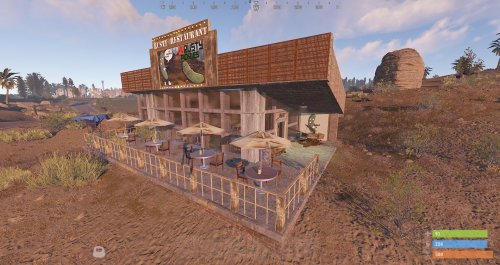
  3. Rusty Restaurant full furnished has three scientist and it has some Loot crate's and a recycler
    • Free
    • 101 Downloads
  4. Empty Hotel unfurnished you can add whatever you like to it have fun
    • Free
    • 56 Downloads
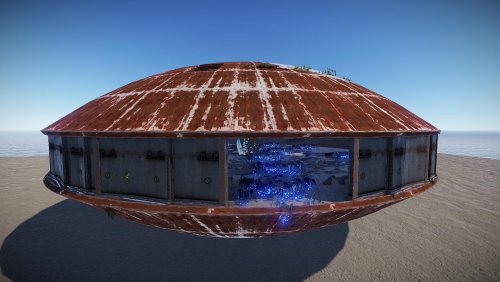
  5. just a simple Rusty UFO you can furnish it how you like have fun with it
    • Free
    • 100 Downloads
  6. 8 Brownstone buildings rebuild with 1 custom building fully furnished 
    • Free
    • 52 Downloads
  7. Scientist-Trailers park design with an empty frame that you can create any type of trailers and some pre-made.
    • Free
    • 51 Downloads

Account

Navigation

Search

Search

Configure browser push notifications

Chrome (Android)
  1. Tap the lock icon next to the address bar.
  2. Tap Permissions → Notifications.
  3. Adjust your preference.
Chrome (Desktop)
  1. Click the padlock icon in the address bar.
  2. Select Site settings.
  3. Find Notifications and adjust your preference.