


BADGYVER
RustEdit Designer
-
Joined
-
Last visited
23 files
-
Fear of the deep sea?
Now you can overcome it with this wonderful window to the ocean.
Stand out on your server with Underwater Train Station, an underwater train station with access to the subway tunnel.
- Contains:
NPCS, Loot, Puzzles and a nice decoration.
- Tip:
You can remove the train tracks and put your own custom ones (Existing tracks can serve as a guide, or if you prefer you can keep them as they are fully functional).
- underwatertrainstation
- trainstation
- train
- station
-
Tagged with:
- underwatertrainstation
- trainstation
- train
- station
- metro
- rail
- railtrack
- armoredtrain
- water
- ocean
- h2o
- mrhankey
- survival
- kit
- survivalkit
- clan
- group
- team
- recycler
- shop
- custom
- badgyver
- resource
- workcart
- wagon
- prefab
- asset
- monument
- rust
- rustgame
- rustplay
- rustserver
- pve
- pvp
- adminresource
- oxide
- carbon
- steam
- roleplay
- role play
- rp
- rustcustommonument
- rustcustomprefab
- rustcustomasset
- $12.90
- 1 Downloads
-
Ghostbusters Barracks
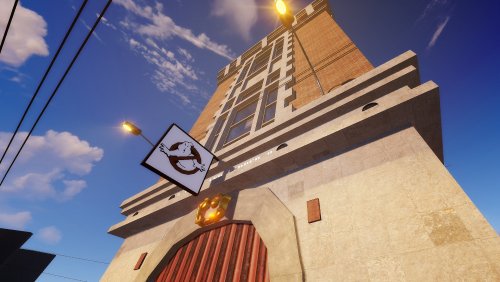
This fire station is used by the ghostbusters.
It has been created with real images of the building.
Includes:
Ghostbusters logo. Workshop, garage, office-reception, break room, laboratory, terrace, basement. Two puzzles, trap, npc, loot.- $12.90
- 6 Downloads
-
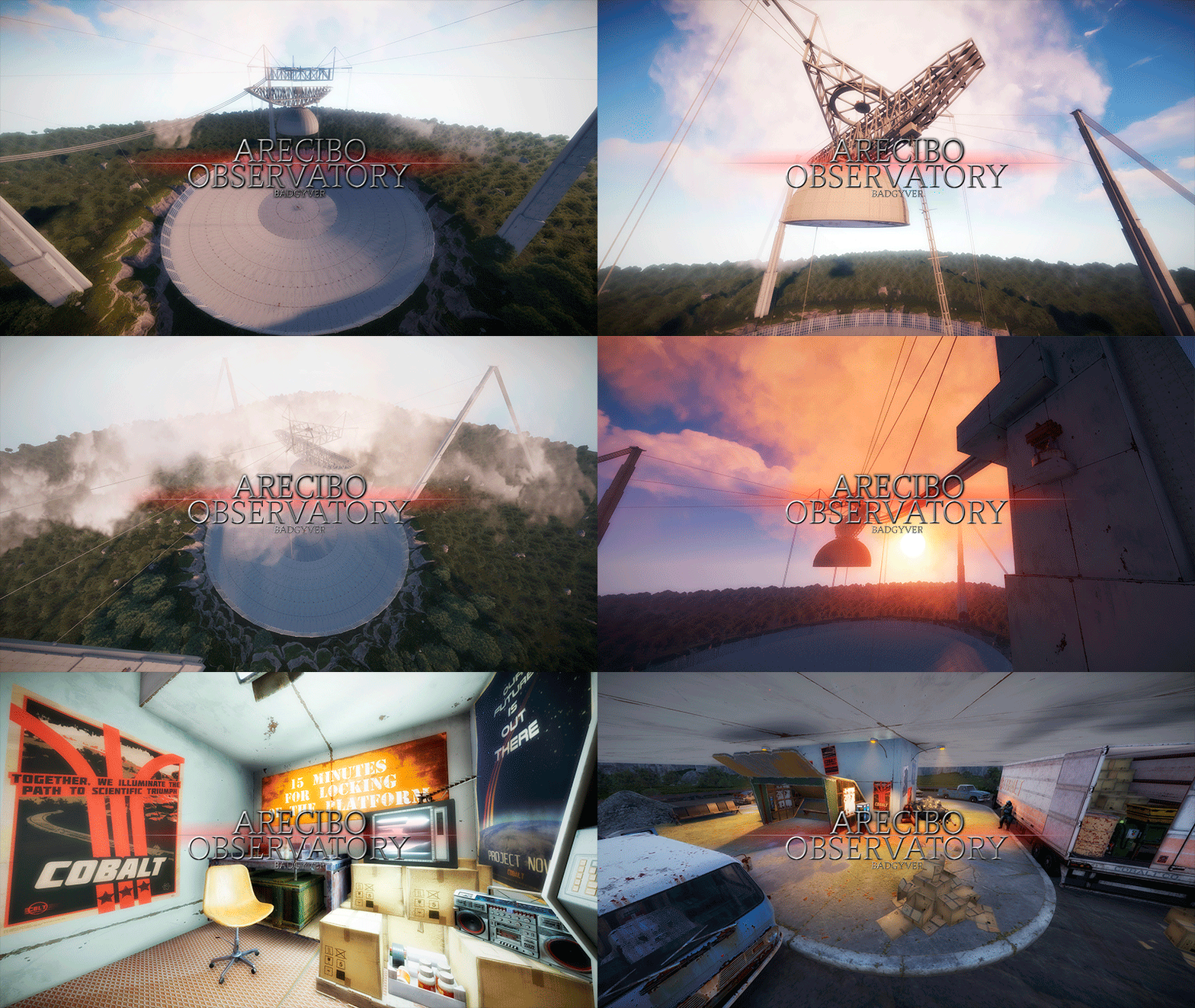
The Arecibo Observatory, also known as the National Astronomy and Ionosphere Center (NAIC) and formerly known as the Arecibo Ionosphere Observatory, is an observatory in Barrio Esperanza, Arecibo, Puerto Rico owned by the US National Science Foundation (NSF).
IT CONTAINS:
Great variety of Parkour, Puzzles, NPCs, Loot, Hackable Crates and a nice decoration. RECOMMENDATION:
This monument has a high difficulty to complete, it is recommended for two players, although with higher difficulty one player can also complete this monument.- arecibo
- observatory
- arecibo observatory
- puertorico
-
Tagged with:
- arecibo
- observatory
- arecibo observatory
- puertorico
- puerto rico
- radiotelescopio
- radio
- radiotelescope
- national
- science
- sciencemind
- foundation
- nationalsciencefoundation
- cornell
- space
- radar
- interstellar
- umet
- planetario
- ratan-600
- rusia
- russia
- usa
- lab
- laboratorio
- laboratory
- tesla
- teslacoil
- puzzle
- redcard
- greencard
- bluecard
- cardreader
- card puzzle
- card
- radiation
- radiaction
- hackablecrate
- hackable crate
- hackablecrates
- npcs
- npc
- npcspawn
- npcloot
- lootbox
- loot
- lootable
- andalusia
- spain
- pvp
- pve
- pub
- zone
- damage
- death
- laser
- kill
- resource
- prefab
- monument
- custom monument
- custom prefab
- custom
- badgyver
- rust
- rust custom
- rustspain
- playrust
- rust custom monument
- rust custom prefab
- custom rust prefab
- asset
- rust asset
- decor
- decorative
- 007
- james bond
- spy
- goldeneye
- mission
- decor prefab
- map
- andalusia map
- apocalypse
- rp
- role play
- roleplay
- oxide
- carbon
- halloween
- fantasy
- fantasy prefab
- fantasy monument
- fantasy asset
- fusible
- fuse
- keycard
- keycards
- parkour
- alarm
- $12.90