



409 files
-
A custom lighthouse with a apocalyptic themed reconstruction and additions.
Entity Count : 204
- $3
- 4 Downloads
- 1 Comments
-
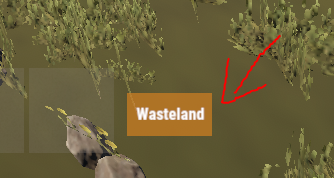
Simple plugin that shows a small UI indicating what zone you are in, It is highly configurable and easy!
Notes:
ZoneManager is required! The text of the zone would be configured in the zonemanager plugins datafile under the name parameter! AlwaysShow - Means that the UI will always be shown weather there is a zone or not! UseWhitelist - True means that it will only show zones that are in the Whitelist! ZoneUISettings - Allows you to add custom UI settings for a zone, If there is none for that zone it results back to the default setting! Permissions:
zoneindicator.use - Shows the UI zoneindicator.import - Allows that player to run the command zindicator_import! Commands:
/zindicator_import - Imports all your zones from ZoneManager Configuration:
{ "AlwaysShow": true, "TextPlaceholder": "Wasteland", "DefaultUI": { "AnchorMin": "0.5 0", "AnchorMax": "0.5 0", "OffsetMin": "190 30", "OffsetMax": "250 60", "FadeSpeed": 0.25, "Color_Background": "0.8 0.5 0.1 0.8", "Color_Text": "1 1 1 1", "TextSize": 12 }, "UseWhitelist": false, "Whitelist": [ "11423859", "25094303" ], "ZoneUISettings": { "11423859": { "AnchorMin": "0.5 0", "AnchorMax": "0.5 0", "OffsetMin": "190 30", "OffsetMax": "250 60", "FadeSpeed": 0.25, "Color_Background": "0.8 0.5 0.1 0.8", "Color_Text": "1 1 1 1", "TextSize": 12 }, "25094303": { "AnchorMin": "0.5 0", "AnchorMax": "0.5 0", "OffsetMin": "190 30", "OffsetMax": "250 60", "FadeSpeed": 0.25, "Color_Background": "0.8 0.5 0.1 0.8", "Color_Text": "1 1 1 1", "TextSize": 12 } } }
- $10
- 7 Downloads
-
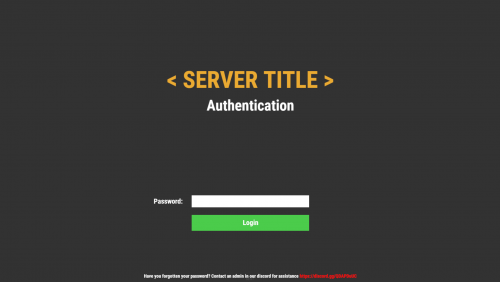
Simple but beautiful user authentication system! Protect your players with a simple authentication system. A password comes a long way! Use a database or local datafile, as it is up to you! With so many features and options to customize! I guarantee you would be satisfied!
Note:
Passwords are now SHA256 Hashed, I have decided to not salt the hashes for the simple reason, if the server or database was breached, the hacker would have access to the salt one way or another, and once they have the salt its pointless! I was thinking of using the players steamid as salt but again, a hacker is not that dumb to not take a look at the plugin to figure it out.
Database table will auto generate if it does not exist!
["UI", "Input", "Secure"] Show/Hide password in the input field
IPAutoAuth - if you logged in previously by the same ip, the login screen will not show up! KeepAuthOnDisconnect overrides if enabled!
Permissions:
userauth.bypass - Bypass the authentication/registration process!
userauth.resetpass - Permission to use the command /resetpass
userauth.movementbypass - Bypass movement lock!
Commands:
/resetpass <steamid> - Resets the given players password, if they are connected registration process would initialize!
Configuration:
{ "DB": { "DB_Host": "localhost", "DB_Name": "userauth", "DB_Password": "", "DB_Port": "3306", "DB_Username": "root", "UseDatabase": false }, "Freeze": { "DisableChat": true, "DisableChatCommands": true, "DisableConsoleCommands": true, "DisableMovement": true, "DisableVoice": true }, "IPAutoAuth": false, "KeepAuthOnDisconnect": false, "Kick": { "Enable_FailedLoginKick": true, "Enable_TimedKick": true, "FailedLoginKickTimes": 3, "TimedKickInSeconds": 60 }, "UI": { "Background_Color": "0.2 0.2 0.2 1", "Button": { "Background_Color": "0.3 0.8 0.3 1", "Text_Color": "1 1 1 1", "Text_Size": 18 }, "Footer": { "Text_Color": "1 1 1 1", "Text_Size": 12 }, "Header": { "Text_Color": "1 1 1 1", "Text_Size": 38 }, "Input": { "Max_Length": 32, "Secure": true }, "Title": { "Text_Color": "0.92 0.67 0.2 1", "Text_Size": 60 } } }
Language:
{ "UI_Title": "< SERVER TITLE >", "UI_Authentication_Header": "Authentication", "UI_Authentication_Button": "Login", "UI_Authentication_Footer": "Have you forgotten your password? Contact an admin in our discord for assistance <color=red>https://discord.gg/QDAPDuUC</color>", "UI_Registration_Header": "Registration", "UI_Registration_Button": "Register", "UI_Registration_Footer": "Do you need some assistance? Contact an admin in our discord for assistance <color=red>https://discord.gg/QDAPDuUC</color>", "Authentication_Kick_Reason": "You did not login in time!", "Registration_Kick_Reason": "You did not register in time!", "Failed_Login_Reason": "You have entered your password wrong a number of times!", "Error_UI_Bad_Password": "Please try again, You have {0} tries left!", "Error_UI_Empty_Password": "No password was provided, please enter a password!", "NoInput": "No input was provided!", "ParseError": "Could not parse input, try again!", "CommandComplete": "Command has been executed successfully!" }
Planned features:
Ability to change password!
Ability to lock registrations!
Ability to protect players when they are locked! "Godmode"
Command whitelist!
Little text recommending that people use a secure/unique password
- $20
- 4 Downloads
-
Run effects on players or yourself! The plugins is primarily used as an API for other plugins like https://weoxide.net/index.php?/file/274-cookingeffectswrapper/
If you want other effects, message me and i can add them :)
Permissions:
effects.use Commands:
/vomit <optional playername> /blur <optional playername> /shake <optional playername> /breathe <optional playername> /lick <optional playername> /killeffects <optional playername> Config:
{ "Effects": { "vomit": { "Enabled": true, "InstantEffect": true, "EffectLengthInSeconds": 60, "EffectInterval": 6 }, "lick": { "Enabled": true, "InstantEffect": true, "EffectLengthInSeconds": 60, "EffectInterval": 6 }, "breathe": { "Enabled": true, "InstantEffect": true, "EffectLengthInSeconds": 60, "EffectInterval": 6 }, "shake": { "Enabled": true, "InstantEffect": true, "EffectLengthInSeconds": 60, "EffectInterval": 6 }, "blur": { "Enabled": true, "InstantEffect": true, "EnableFlashing": true, "StaticBlurOpacity": 0.5, "FlashingBlurOpacity": 0.3, "EffectLengthInSeconds": 60, "EffectInterval": 6 } } } Hooks:
void EffectVomit(BasePlayer Player, int Length, float Interval, bool Instant) void EffectShake(BasePlayer Player, int Length, float Interval, bool Instant) void EffectBlur(BasePlayer Player, int Length, float Interval, bool Instant, bool Flashing) void EffectLick(BasePlayer Player, int Length, float Interval, bool Instant) void EffectBreathe(BasePlayer Player, int Length, float Interval, bool Instant)- $10
-
Make custom commands, custom crafts, etc! Enter a command and it checks if you got the stuff and the correct amount and executes the configured command!
Notes:
If Permission or Message is not set aka "" then they will be skipped! Configuration:
{ "Commands": { "firebullets": { "ExecuteCommand": "giveto {1} ammo.rifle.incendiary 64", "Permission": "firebullets", "Message": "Enjoy the fire bullets!", "TakeItems": true, "Items": [ { "Shortname": "ammo.rifle", "Amount": 64 }, { "Shortname": "lowgradefuel", "Amount": 32 } ] } } }
- $5
- 2 Downloads
-
- Free
- 88 Downloads
-
Magic Poncho is an item with a custom skin and additional abilities to farm more resources in the game.
Poncho is slightly visible in the dark.
The plugin provides the ability to customize which item needs to be increased when collecting or farming resources.
The plugin provides the ability to smelt the extracted resources.
Ponchos can be repaired because ponchos lose their durability when farmed.
The plugin provides the ability to craft a poncho.
It is possible to issue an item through the server console, a command in the chat, or through another plugin.
In order for players to find the item, there are settings for item spawning in loot boxes.
Permission Smelting = magicponcho.smelting
Permission Craft=magicponcho.craft
chat command.
Enable/disable smelting = smelting
Item craft=craftponcho
console command.
Give item to player = giveponcho SteamID
To issue a poncho through another plugin, use.
Identifier item skin = 2806678960
Item shortname = attire.hide.poncho
Item name = Magic military poncho
Default config file.
{ "Global settings": { "Item name": "Magic militari poncho", "How fast the item breaks (by default, the item has 250 HP)": 1.0, "Enable smelting of mined resources": false, "Enable crafting poncho": false, "Enable spawn for poncho in loot boxes": false }, "Multiplier settings": { "Item list (item shortname : multiplier)": { "wood": 2.0, "stones": 2.0, "sulfur.ore": 2.0, "metal.ore": 2.0, "hq.metal.ore": 2.0, "leather": 2.0, "bone.fragments": 2.0, "fat.animal": 2.0, "cloth": 2.0, "bearmeat": 2.0, "meat.boar": 2.0, "horsemeat.raw": 2.0, "deermeat.raw": 2.0, "wolfmeat.raw": 2.0, "chicken.raw": 2.0, "cactusflesh": 2.0, "mushroom": 2.0, "potato": 2.0, "seed.potato": 2.0, "seed.hemp": 2.0, "pumpkin": 2.0, "seed.pumpkin": 2.0, "corn": 2.0, "seed.corn": 2.0, "yellow.berry": 2.0, "seed.yellow.berry": 2.0, "green.berry": 2.0, "seed.green.berry": 2.0, "red.berry": 2.0, "seed.red.berry": 2.0, "blue.berry": 2.0, "seed.blue.berry": 2.0, "black.berry": 2.0, "seed.black.berry": 2.0, "white.berry": 2.0, "seed.white.berry": 2.0 } }, "Crafting settings": { "Cost of manufacturing poncho": { "scrap": 250, "leather": 10, "sewingkit": 1 } }, "Spawn settings": { "What crates can contain ponchos (item shortname : chance drop)": { "bradley_crate": 25, "heli_crate": 25 } } }
- $3
- 1 Downloads
-
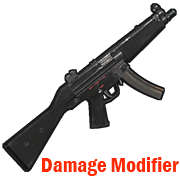
Modifies the damage from your weapon.
Permission = "weapondamagemodifier.use";
Some weapons have already been added to the config file for example.
You can edit the list to your liking by adding or removing weapons from the list.
How to find out the shortname of a weapon?
Enable debugging in the config file.
"Default: what weapon the player is using, what damage was received from this weapon.": true,
"Modifier: what weapon the player is using, what damage was received from this weapon.": true
Reload the plugin.
Choose an active weapon for your character, and deal damage to the entity.
Information will be displayed to you in the server console.
"Hit Info (Initiator - who did the damage). Weapon (ShortName - what weapon). Damage (Total - what was the damage)."
Copy the name of the weapon and add it to the list in your config file.
Save the config file.
Reload the plugin.
Default config file.
{ "Debag settings": { "Default: what weapon the player is using, what damage was received from this weapon.": true, "Modifier: what weapon the player is using, what damage was received from this weapon.": true }, "Multiplier settings": { "Weapon list (weapon shortname : multiplier)": { "explosive.timed.deployed": 1.0, "explosive.satchel.deployed": 1.0, "grenade.beancan.deployed": 1.0, "grenade.f1.deployed": 1.0, "rocket_basic": 1.0, "rocket_hv": 1.0, "rocket_fire": 1.0, "mp5.entity": 1.0, "thompson.entity": 1.0, "m92.entity": 1.0, "bolt_rifle.entity": 1.0, "l96.entity": 1.0, "m39.entity": 1.0 } } }
- $2
- 10 Downloads
-
Connecting to your server using the specified Steam ID.
Good for testing a server, or for a group of friends who need privacy.
Just add a Steam ID to the config file and you will be able to connect to the server.
Default config file.
{ "Connect [SteamID]": [ "*****************", "*****************" ] }
- Free
- 13 Downloads
-
Maybe someday you need to cure your horse?
Then this plugin is for you.
Take the medical syringe and walk close to the horse and press the right mouse button.
1 medical syringe will restore 25 HP for a horse.
Permission "horsetreatment.use"
Configuration file.
{ "Settings": { "Horse Life Recovery Quantity.": 25.0 } }
- Free
- 16 Downloads