



Files posted by Ionut Shiro
-
Hey everyone.
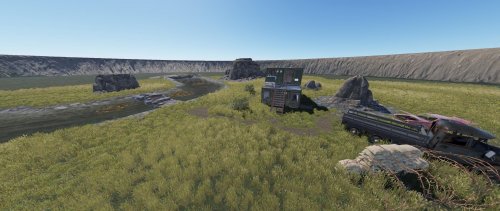
Here, I am including a small arena, basically designed with a natural surrounding, along with a small river, cliffs, and a cabin for players to take cover.
FEATURES:
- The arena itself, is divided into a 2 team sections, a RED and BLUE circle marks the location on the compound walls.
- There is a cube designed above the arena for spectators. Also has some picture frames for advertisement.
- Open area for players to move, and plan a strategic plan to get to the other side.
- Total prefabs: 58
- Includes the Splat, Height, River and Topology settings along with the arena.
NOTE: You may be required to download the Oxide.Ext.RustEdit.dll library to use for your custom map.
You can join my Discord if you like to find out more about my content, or if you have any bugs, questions, queries.
Thank you very much for your time and have a great day.
- Free
- 45 Downloads
-
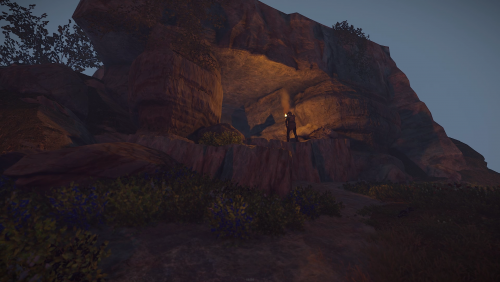
This cave has been built getting inspiration from the old rust caves after someone asked me in discord if they can be rebuilt so i had a go at it and this is how far i could make it to look like the old rust caves
Enjoy it
- Free
- 187 Downloads
-
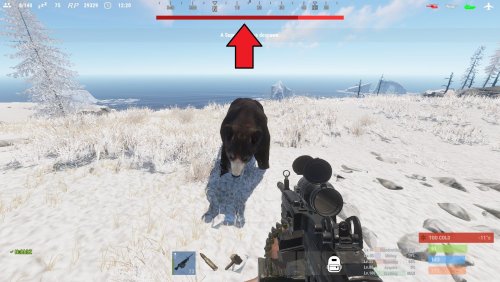
See your targets health with a nice HUD. With 4 customizable styles, change it up how ever you would like it to be, you can change the texts format, colors, etc!
Note:
if none of the styles suit you, you can always ask me to make a new one, just give me a rough sketch and I will make it!
With an internal whitelist you can choose what entities the HUD will trigger on "shortprefabname"!
"ActiveTargetDuration" is the length the HUD will be shown for when you attack a target, the length is reset if you attack a target again!
TextFormat {0} = target name, {1} = target current health, {2} = target max health
By default, the lang file is set to show the targets display name, and is set to null in the file. You can change from null to anything you want that entity to be shown as, for example "chicken": "Mr. Pecker!"
Styles:
top detailed
top thin
hotbar detailed
hotbar thin
Permission:
targethealthhud.use
Config:
{ "Style": "top detailed", "TextFormat": "{0} {1}/{2} HP", "ActiveTargetDuration": 60, "Whitelist": [ "npc_bandit_guard", "scientistnpc_ch47_gunner", "scientistnpc_oilrig", "scientistnpc_excavator", "scientistnpc_junkpile_pistol", "scientistnpc_roam", "scientistnpc_roamtethhered", "scientistnpc_patrol", "scientistnpc_peacekeeper", "scientistnpc_heavy", "scientistnpc_full_pistol", "scientistnpc_full_any", "scientistnpc_full_mp5", "scientistnpc_full_lr300", "scientistnpc_full_shotgun", "scientistnpc_cargo", "scientistnpc_cargo_turret_any", "scientistnpc_cargo_turret_lr300", "npc_underwaterdweller", "npc_tunneldweller", "patrolhelicopter", "bradleyapc", "simpleshark", "bear", "boar", "chicken", "stag", "wolf" ], "UI General": { "TextColor": "1 1 1 1", "PrimaryColor": "0.7058824 0.07843138 0.07843138 1", "SecondaryColor": "1 0.1960784 0.1960784 1" }, "UI Styles": { "Top Detailed": { "AnchorMin": "0.3297916 0.9127777", "AnchorMax": "0.6683334 0.9424074" }, "Top Thin": { "AnchorMin": "0.3297916 0.9127777", "AnchorMax": "0.6683334 0.9312962" }, "Hotbar Detailed": { "AnchorMin": "0.3437505 0.1185186", "AnchorMax": "0.6406256 0.1462963" }, "Hotbar Thin": { "AnchorMin": "0.34375 0.1203704", "AnchorMax": "0.640625 0.1314815" } } }
Language:
{ "npc_bandit_guard": null, "scientistnpc_ch47_gunner": null, "scientistnpc_oilrig": null, "scientistnpc_excavator": null, "scientistnpc_junkpile_pistol": null, "scientistnpc_roam": null, "scientistnpc_roamtethhered": null, "scientistnpc_patrol": null, "scientistnpc_peacekeeper": null, "scientistnpc_heavy": null, "scientistnpc_full_pistol": null, "scientistnpc_full_any": null, "scientistnpc_full_mp5": null, "scientistnpc_full_lr300": null, "scientistnpc_full_shotgun": null, "scientistnpc_cargo": null, "scientistnpc_cargo_turret_any": null, "scientistnpc_cargo_turret_lr300": null, "npc_underwaterdweller": null, "npc_tunneldweller": null, "patrolhelicopter": null, "bradleyapc": null, "simpleshark": null, "bear": null, "boar": null, "chicken": null, "stag": null, "wolf": null }
- $10
- 13 Downloads
-
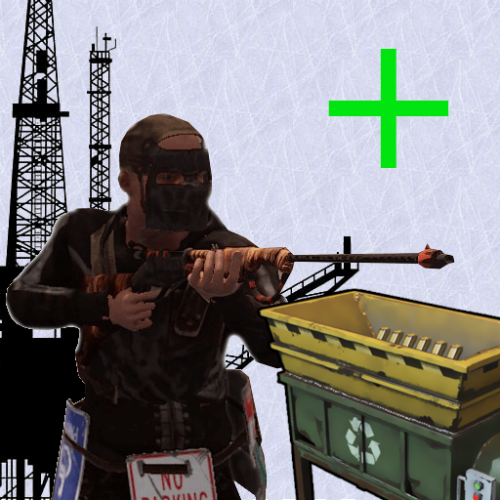
Recyclers are back on the oil rigs just like it used to be! You can customize the location of the recycler however you want!
Notes:
OilrigAI = Small Oil Rig
OilrigAI2 = Large Oil Rig
Use RustEdit to get the position and rotation information if you plan on changing its location! "place the oil rig prefab in the center of the map, set its position and rotation all to 0 and then place your recycler and get its position/rotation"
Configuration:
- $5
- 1 Downloads
-
Lock players inventory's instantly through command or permissions!
Commands:
/lock playername type
/unlock playername type
*type = "wear, main, belt"
Permissions:
inventorylock.use
inventorylock.bypass
inventorylock.main
inventorylock.belt
inventorylock.wear
Language:
- $5
-
This plugin lets you control every aspect of a FishTrap! From its percentage of catch to how often it catches! You can make fish traps 2X or 5X!
This plugin is compatible with ContinuousFishTraps!
Note:
Do not change the name of the fish in the targetWildlife!
decayDamageScale: 1 being 100% of the fishtraps health!
Weight: is like a percentage of catch, for example you have 60% chance to catch minnows!
tickRate: is for how often u want the fishtrap to catch fish!
trappedEffectRepeatRate: is how often do u want the effect that a fish has been caught to occur!
trapSuccessRate: what chance do u want the fish traps to catch fish on the first try! 1 being 100%
Example config to ignore certain bait
"ignoreBait": [
"bearmeat.cooked",
"pumpkin"
]
Configuration: "Note: The default config has the default configuration of a vanilla fish trap"
To do:
Custom loot table!
- $5
-
This plugin lets the fish traps run without stopping! Normally when using the fish traps you have to empty them out or just at least open them to reset them to catch another fish.
This plugin is compatible with FishtrapController
Permission:
continuousfishtraps.use
Configuration:
- $5
-
Block the use of certain tools when gathering an NPC, Player, Animal, Node, Tree, ETC! Control what tools they cannot use!
Permissions:
bettertoolblocker.bypass
Configuration:
Language:
- $5
-
You can skin items that are already placed!
Note:
To be able to use this plugin, the player first must have the permission or be in a group with the permission.
You can only skin an object that is whitelisted in the config.
Only add an items that are skinable into the whitelist!
To be able to change the skin of an object, it must be in the whitelist! And then only if you placed it, or are authorized on the TC, and if you have 'UseTeams' enabled, you can skin items placed by members from your team.
It is ideal to stand fully and look at the object directly before skinning, because the raycast ray is positioned to your head!
Permissions:
skinsight.use "Command: /skinitem"
skinsight.reset "Command: /skinreset"
skinsight.info "Command: /getskinid"
skinsight.bypass "Allows you to use the commands, bypassing the security checks!"
Commands:
/skinitem skinid
/skinreset
/getskinid
Configuration:
Language:
- $5