
Shiro
Administrator
-
Joined
-
Last visited
Everything posted by Shiro
-
-
-
-
Both archives can be extracted or unzipped even drag and dropped without any issues so whatever you're doing you're doing it wrong , tested it just earlier myself. FYI we do not approve reviews made for no reason for end-user faults next time you leave a review think of something that's actually useful please !
-
View File Automate Your Rust Server Monetization with the WeOxide Shop and Woxide plugin Woxide is an Oxide plugin that streamlines the process of integrating your Rust server with your WeOxide Shop. Designed for server owners who prefer to set up their own payment gateways, Woxide enables you to automate the delivery of in-game purchases without sacrificing control or revenue. When a player makes a purchase on your website, this plugin will automatically detect the purchase and run the corresponding command in-game, such as adding the player to a VIP group or giving them a special item. Woxide is the solution for creating a self-managed, profitable Rust server. 🔗 Integration: Woxide is designed to work with your WeOxide Shop, allowing you to set up your own payment gateways, such as PayPal or Stripe. Keep full control over your revenue and eliminate third-party fees. 🛠️ Server-Side Command Automation: Woxide simplifies the process of executing server-side commands for purchased items. Configure the plugin according to your needs, and let it handle the rest. 📥Seamless Purchase Processing: Woxide continuously monitors your WeOxide Shop for new purchases, ensuring that players receive their in-game rewards promptly. The plugin checks the local data file to avoid duplicate processing. 📢In-Game Purchase Acknowledgment: Woxide automatically broadcasts a thank you message in the in-game chat when a purchase is processed, fostering a sense of community and promoting additional sales. 🔧Configuration: Woxide has an easy-to-use configuration, enabling you to tailor the plugin to your server's unique requirements. Check out the documentation for a config example. Before you start To access this plugin, it is necessary to use WeOxide Server hosting and have an active server and website. If you don't have a server yet, you can order one today at https://weoxide.host/rust.php specifically for Rust and start using the plugin. Installation Upload the Woxide plugin file to the oxide/plugins directory on your Rust server. Start your Rust server. The Woxide plugin should now be installed and loaded. Start editing the config file based on your products & setup. Configuration The Woxide plugin comes with a default configuration file that you can modify to suit your needs. You can find the configuration file at oxide/config/Woxide.json. The configuration file has the following options: shopUrl: The URL of your WeOxide Shop. keyLicense: Provided by WeOxide after shop is activated. secLicense: Provided by WeOxide after shop is activated. products: dictionary of product IDs and their corresponding commands. For example, you might have a product with an ID of 123 that adds the player to a VIP group for 30 days. You would add this product to the dictionary like this: "products": { "123": { "command": "oxide.usergroup add {PLAYERNAME} vip", "expires": 30, "expireCommand": "oxide.usergroup remove {PLAYERNAME} vip" } } In this example, the {PLAYERNAME} placeholder will be replaced with the player's in-game name when the command is run. The expires (optional) option specifies the number of days that the player should remain in the VIP group, and the expireCommand (optional) option specifies the command to run when the player's VIP status expires. You can add as many products to the dictionary as you like. It is important to include {PLAYERNAME} in the command to ensure that the group or item is given to the correct player who made the purchase. Example config file This is an example configuration file. You can use this as a template and modify the values to match your own products and setup. To use this example configuration, simply copy and paste the code into your Woxide configuration file and save it. Make sure to replace the values for shopUrl, keyLicense, and secLicense with your own values. The products section defines the products that are available for purchase on your shop, and the corresponding commands to run in-game. You can add, remove, or modify these products to fit your needs. { "shopUrl": "example.weoxiders.net", "keyLicense": "PROVIDED_BY_WEOXIDE_AFTER_ACTIVATION", "secLicense": "PROVIDED_BY_WEOXIDE_AFTER_ACTIVATION", "products": { "366": { "command": "oxide.usergroup add {PLAYERNAME} vip", "expires": 30, "expireCommand": "oxide.usergroup remove {PLAYERNAME} vip" }, "358": { "command": "oxide.usergroup add {PLAYERNAME} vip", "expires": 30, "expireCommand": "oxide.usergroup remove {PLAYERNAME} vip" }, "169": { "command": "inventory.giveto {PLAYERNAME} electric.generator.small 1", "expires": 1 } } } Notice on config file It is strongly recommend to add "1" on expires on in-game items purchases, shown as above in the example. In case of a data file loss, it would not run the command again the on the server by mistake. Commands The Woxide Shop plugin provides the following console commands: woxide.check: Manually checks for new orders and fulfills them. woxide.stop: Stops the automatic order checking. woxide.start: Starts the automatic order checking. woxide.test: Tests the connection to the shop. Permissions The Woxide Shop plugin provides the following permission: woxide.use: Allows the player to use the /woxide.check in-game command. Stuff to avoid A small list of stuff you should not do: Under no circumstances should you delete the data file located in oxide/data/Woxide while wiping the server. This file records all purchases locally on your Oxide server. It is recommended to create a backup of all files before making any significant changes to your server. Please avoid (or do not) modifying the order checking frequency in the Woxide.cs file. If necessary, any changes should be thoroughly tested to ensure compatibility with the shop. By default, the plugin checks orders every 90 seconds (1.5 minutes), which is suitable for most scenarios. Submitter Shiro Submitted 05/14/2023 Category Tools
-
 Woxide is an Oxide plugin that streamlines the process of integrating your Rust server with your WeOxide Shop. Designed for server owners who prefer to set up their own payment gateways, Woxide enables you to automate the delivery of in-game purchases without sacrificing control or revenue. When a player makes a purchase on your website, this plugin will automatically detect the purchase and run the corresponding command in-game, such as adding the player to a VIP group or giving them a special item. Woxide is the solution for creating a self-managed, profitable Rust server. 🔗 Integration: Woxide is designed to work with your WeOxide Shop, allowing you to set up your own payment gateways, such as PayPal or Stripe. Keep full control over your revenue and eliminate third-party fees. 🛠️ Server-Side Command Automation: Woxide simplifies the process of executing server-side commands for purchased items. Configure the plugin according to your needs, and let it handle the rest. 📥Seamless Purchase Processing: Woxide continuously monitors your WeOxide Shop for new purchases, ensuring that players receive their in-game rewards promptly. The plugin checks the local data file to avoid duplicate processing. 📢In-Game Purchase Acknowledgment: Woxide automatically broadcasts a thank you message in the in-game chat when a purchase is processed, fostering a sense of community and promoting additional sales. 🔧Configuration: Woxide has an easy-to-use configuration, enabling you to tailor the plugin to your server's unique requirements. Check out the documentation for a config example. Before you start To access this plugin, it is necessary to use WeOxide Server hosting and have an active server and website. If you don't have a server yet, you can order one today at https://weoxide.host/server/rust specifically for Rust and start using the plugin. Installation Upload the Woxide plugin file to the oxide/plugins directory on your Rust server. Start your Rust server. The Woxide plugin should now be installed and loaded. Start editing the config file based on your products & setup. Configuration The Woxide plugin comes with a default configuration file that you can modify to suit your needs. You can find the configuration file at oxide/config/Woxide.json. The configuration file has the following options: shopUrl: The URL of your WeOxide Shop. keyLicense: Provided by WeOxide after shop is activated. secLicense: Provided by WeOxide after shop is activated. products: dictionary of product IDs and their corresponding commands. For example, you might have a product with an ID of 123 that adds the player to a VIP group for 30 days. You would add this product to the dictionary like this: "products": { "123": { "command": "oxide.usergroup add {PLAYERNAME} vip", "expires": 30, "expireCommand": "oxide.usergroup remove {PLAYERNAME} vip" } } In this example, the {PLAYERNAME} placeholder will be replaced with the player's in-game name when the command is run. The expires (optional) option specifies the number of days that the player should remain in the VIP group, and the expireCommand (optional) option specifies the command to run when the player's VIP status expires. You can add as many products to the dictionary as you like. It is important to include {PLAYERNAME} in the command to ensure that the group or item is given to the correct player who made the purchase. Example config file This is an example configuration file. You can use this as a template and modify the values to match your own products and setup. To use this example configuration, simply copy and paste the code into your Woxide configuration file and save it. Make sure to replace the values for shopUrl, keyLicense, and secLicense with your own values. The products section defines the products that are available for purchase on your shop, and the corresponding commands to run in-game. You can add, remove, or modify these products to fit your needs. { "shopUrl": "example.weoxiders.net", "keyLicense": "PROVIDED_BY_WEOXIDE_AFTER_ACTIVATION", "secLicense": "PROVIDED_BY_WEOXIDE_AFTER_ACTIVATION", "products": { "366": { "command": "oxide.usergroup add {PLAYERNAME} vip", "expires": 30, "expireCommand": "oxide.usergroup remove {PLAYERNAME} vip" }, "358": { "command": "oxide.usergroup add {PLAYERNAME} vip", "expires": 30, "expireCommand": "oxide.usergroup remove {PLAYERNAME} vip" }, "169": { "command": "inventory.giveto {PLAYERNAME} electric.generator.small 1", "expires": 1 } } } Notice on config file It is strongly recommend to add "1" on expires on in-game items purchases, shown as above in the example. In case of a data file loss, it would not run the command again the on the server by mistake. Commands The Woxide Shop plugin provides the following console commands: woxide.check: Manually checks for new orders and fulfills them. woxide.stop: Stops the automatic order checking. woxide.start: Starts the automatic order checking. woxide.test: Tests the connection to the shop. Permissions The Woxide Shop plugin provides the following permission: woxide.use: Allows the player to use the /woxide.check in-game command. Stuff to avoid A small list of stuff you should not do: Under no circumstances should you delete the data file located in oxide/data/Woxide while wiping the server. This file records all purchases locally on your Oxide server. It is recommended to create a backup of all files before making any significant changes to your server. Please avoid (or do not) modifying the order checking frequency in the Woxide.cs file. If necessary, any changes should be thoroughly tested to ensure compatibility with the shop. By default, the plugin checks orders every 90 seconds (1.5 minutes), which is suitable for most scenarios.$8
 -
View File WeOxiders Template 1 A simple website template that can be easily installed by adding the zip file to your website's root directory and unzipping it! Demo : https://template7.weoxiders.net All changes can be done from index.php To enable live data from your server to the website add your API Key from rust-servers.net here If you wish to have more than 1 server just copy the first 14 lines and paste below and adjust data1/players1 with the number of servers you adding be it 2 or 3 or more. To change the youtube videos you just go on youtube and press share as embed and copy the link similar to this and replace it on the server you edit for If you have any questions or require help to configure it do not hesitate to contact me here or on discord! If you want a pre-made website check out our hosting https://weoxide.host and check our website builder page! Submitter Shiro Submitted 04/26/2023 Category Templates
-
 A simple website template that can be easily installed by adding the zip file to your website's root directory and unzipping it! Demo : https://template7.weoxiders.net All changes can be done from index.php To enable live data from your server to the website add your API Key from rust-servers.net here If you wish to have more than 1 server just copy the first 14 lines and paste below and adjust data1/players1 with the number of servers you adding be it 2 or 3 or more. To change the youtube videos you just go on youtube and press share as embed and copy the link similar to this and replace it on the server you edit for If you have any questions or require help to configure it do not hesitate to contact me here or on discord! If you want a pre-made website check out our hosting https://weoxide.host and check our website builder page!$25
 -
View File Seongapdo Island 4K Seongapdo Island is a real-life island located off the coast of South Korea. Known for its stunning natural scenery and historical landmarks the island was also used as a filming location for the hit Netflix series "Squid Game". The map terrain features rugged mountains, deep forests, and rocky cliffs that overlook the sea. I've managed to capture the natural beauty and ruggedness of the real-life island, with its mountainous terrain and scenic lake. Including procedural monuments and custom prefabs adds an interesting twist to the gameplay, allowing players to explore the island and engage in various activities. The large tunnel through the mountains adds an element of adventure and exploration to the map, and the custom safezone on the lake provides a peaceful retreat for players. Map been optimized to run on low entity count and ensure players satisfaction. Password in the ReadMe file. ~Procedural Monuments : - Launch Site - Excavator - Military Tunnels - Airfield - Power Plant - Water Treatment Plant - Trainyard - Sewerbranch - Bandit Camp - Compound - Junkyard - Sphere Tank - Satellite Dish - Desert Military Base - Roadside monuments including Supermarkets - Mining Outposts - Fishing Villages - Lighthouses - Stables - Supermarkets & Mining Outposts and Gas Stations - Large and Small Oil Rigs - Several underwater Labs ~ Entity Count : 10940 ~ Map Size : 4000 Submitter Shiro Submitted 04/06/2023 Category Maps
-
 Seongapdo Island is a real-life island located off the coast of South Korea. Known for its stunning natural scenery and historical landmarks the island was also used as a filming location for the hit Netflix series "Squid Game". The map terrain features rugged mountains, deep forests, and rocky cliffs that overlook the sea. I've managed to capture the natural beauty and ruggedness of the real-life island, with its mountainous terrain and scenic lake. Including procedural monuments and custom prefabs adds an interesting twist to the gameplay, allowing players to explore the island and engage in various activities. The large tunnel through the mountains adds an element of adventure and exploration to the map, and the custom safezone on the lake provides a peaceful retreat for players. Map been optimized to run on low entity count and ensure players satisfaction. Password in the ReadMe file. ~Procedural Monuments : - Launch Site - Excavator - Military Tunnels - Airfield - Power Plant - Water Treatment Plant - Trainyard - Sewerbranch - Bandit Camp - Compound - Junkyard - Sphere Tank - Satellite Dish - Desert Military Base - Roadside monuments including Supermarkets - Mining Outposts - Fishing Villages - Lighthouses - Stables - Supermarkets & Mining Outposts and Gas Stations - Large and Small Oil Rigs - Several underwater Labs ~ Entity Count : 10940 ~ Map Size : 4000$20
 -
-
View File Australia Map This is a custom map , made by an Aussie , all set up like is in Australia , all comes with stock prefabs , but has few custom ones like the train station that stop at all monuments , Ayers Rock that has 2 cave systems if you want any custom prefabs added , dm me about it ~Procedural Monuments : - Excavator - Airfield - Power Plant - Water Treatment Plant - Trainyard with bradley and train stations - Sewerbranch - Harbor - Sphere Tank - Satellite Dish - Desert Military Base with a bradley - Roadside monuments including Supermarkets - Mining Outposts - Fishing Villages - Lighthouses - Stables - Supermarkets & Mining Outposts and Gas Stations - Large and Small Oil Rigs - Several underwater Labs -hq .sulfure , stone quarry's -aryes rocks caves ~ Entity Count : 15442 ~ Map Size : 6000. vid below show's you all the monuments that the map has Submitter Shiro Submitted 03/20/2023 Category Maps
-
-
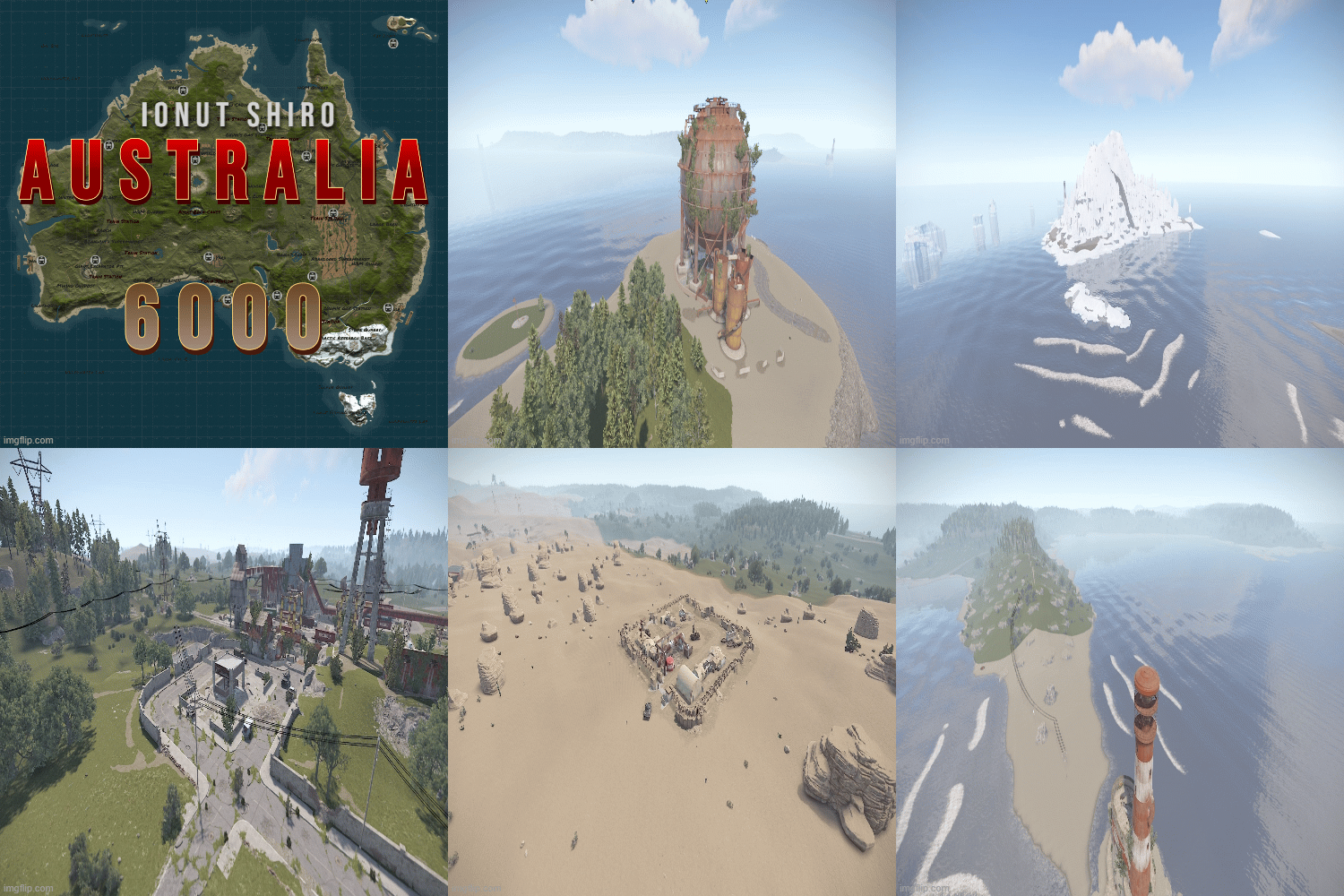 This is a custom map , made by an Aussie , all set up like is in Australia , all comes with stock prefabs , but has few custom ones like the train station that stop at all monuments , Ayers Rock that has 2 cave systems if you want any custom prefabs added , dm me about it ~Procedural Monuments : - Excavator - Airfield - Power Plant - Water Treatment Plant - Trainyard with bradley and train stations - Sewerbranch - Harbor - Sphere Tank - Satellite Dish - Desert Military Base with a bradley - Roadside monuments including Supermarkets - Mining Outposts - Fishing Villages - Lighthouses - Stables - Supermarkets & Mining Outposts and Gas Stations - Large and Small Oil Rigs - Several underwater Labs -hq .sulfure , stone quarry's -aryes rocks caves ~ Entity Count : 15442 ~ Map Size : 6000. vid below show's you all the monuments that the map has$15
 -
View File Stalker Nuclear Power Plant The monument was created based on the game Stalker: Shadow of Chernobyl and is a similar copy to the game version of Chaes. It features custom corridors from the original version with the addition of riddles and Loot Rooms. At the location, you can find 3 elite boxes using access cards and 2 without access cards. This is one of the many upcomming monuments from our S.T.A.L.K.E.R inspired project and it was realised by a good friend of mine. Entity Count: 7745 Submitter Shiro Submitted 03/11/2023 Category Monuments
-
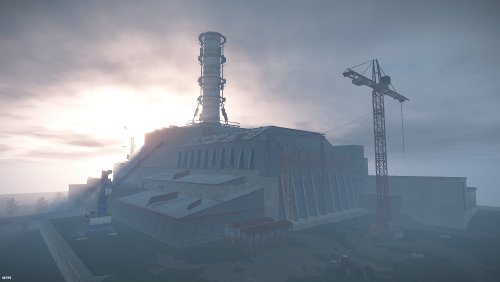 The monument was created based on the game Stalker: Shadow of Chernobyl and is a similar copy to the game version of Chaes. It features custom corridors from the original version with the addition of riddles and Loot Rooms. At the location, you can find 3 elite boxes using access cards and 2 without access cards. This is one of the many upcomming monuments from our S.T.A.L.K.E.R inspired project and it was realised by a good friend of mine. Entity Count: 7745$15
 -
View File Stalker Bar This is a full scale safezone-bar from S.T.A.L.K.E.R Shadow of Chernobyl , it features a small sized safezone with underground vending machines and gambling area. This is one of the many upcomming monuments from our S.T.A.L.K.E.R inspired project and it was realised by a good friend of mine. Entity Count: 1961 Submitter Shiro Submitted 03/11/2023 Category Monuments
-
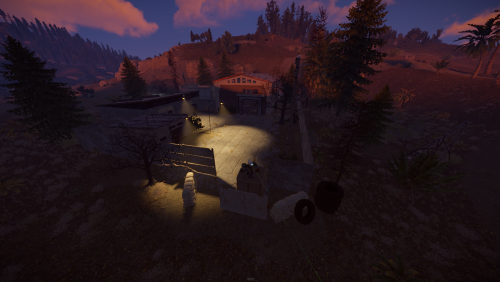 This is a full scale safezone-bar from S.T.A.L.K.E.R Shadow of Chernobyl , it features a small sized safezone with underground vending machines and gambling area. This is one of the many upcomming monuments from our S.T.A.L.K.E.R inspired project and it was realised by a good friend of mine. Entity Count: 1961$8
 -
View File Altair 3K - With Launch Site Immerse your players in world packed with monuments and beautiful aesthetics. This 3k map contains every vanilla monument, caves, a zipline path from Power Plant to Train Yard, freshwater lakes, and a custom mineshaft with a secret building area and loot. Below is a full list of monuments included. Altair features a very high monument count, including everyone's favorite, Launch Site, but with balanced building space kept in mind. Your players will love the endless variety, and because the map is 3K, players will be contesting monuments like never before. This map is the closest you can come to pleasing everyone! Altair also features a higher node count than typical procgen maps . Nodes spawn on all topology and biomes (Fields, forests, deserts, etc.) not just on cliffsides, providing a much needed increase in building materials. Your players can recover from a raid quicker or take care of upkeep in their massive compound, so that they can focus on PVPing. This is also a great way to keep players from moving on to a new server if their base is raided, since rebuilding a base can be a daunting task at times. All of my maps have one goal in common, increasing engagement and retaining players. Through trial, error, and suggestions on my own personal servers, I can confidently say that this map is perfect for up and coming servers with pop at or below 75. General Information: Map size: 3K Approximate Prefab count: 7770 All monuments are vanilla. There is one custom mineshaft with loot and a secret building area inside. Map Highlights: Large tunnel system. High monument density with balanced room for player to build. Launch Site is included, which is not possible for this map size through procedural generated maps. Multiple rivers and lakes. Small building blocked radius around quarries to prevent walling in. Every vanilla monument is included and hand placed in this map. Monuments Included: Airfield Arctic Research Base Bandit Camp Caves (4) Compound Desert Military Base Dome Excavator Fishing Village (4) Freshwater handmade lakes Gas Station Harbor 1 & 2 HQM Quarry Ice Lake (3) Junkyard Launch Site Lighthouse (2) Military Tunnels Mineshaft Tunnel Large & Small Oil Rigs Power Plant Powerline Zipline Path Sewer Branch Stables A Stone Quarry Sulfur Quarry Supermarket (2) Swamp (2) Train Yard Underwater Labs (2) Warehouse (2) Water Treatment Plant Water Well (5) Password is included with the map file. After purchase, you may edit or adjust however you see fit. To report bugs, feel free to message me here, or on discord: 𝓡𝓲𝓬𝓱𝓪𝓻𝓭 𝓗𝓮𝓻𝓽𝔃#0001 Submitter 𝓡𝓲𝓬𝓱𝓪𝓻𝓭 𝓗𝓮𝓻𝓽𝔃 Submitted 02/16/2023 Category Maps
-
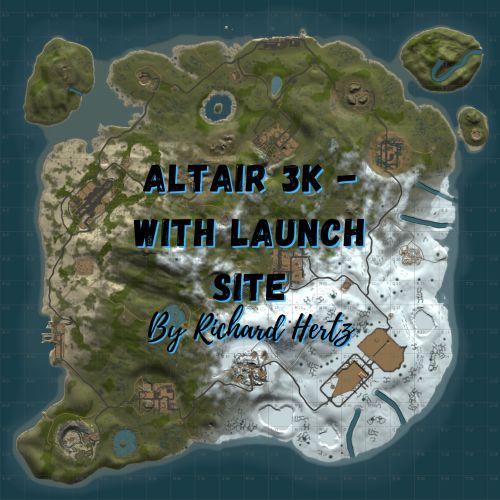 Immerse your players in world packed with monuments and beautiful aesthetics. This 3k map contains every vanilla monument, caves, a zipline path from Power Plant to Train Yard, freshwater lakes, and a custom mineshaft with a secret building area and loot. Below is a full list of monuments included. Altair features a very high monument count, including everyone's favorite, Launch Site, but with balanced building space kept in mind. Your players will love the endless variety, and because the map is 3K, players will be contesting monuments like never before. This map is the closest you can come to pleasing everyone! Altair also features a higher node count than typical procgen maps . Nodes spawn on all topology and biomes (Fields, forests, deserts, etc.) not just on cliffsides, providing a much needed increase in building materials. Your players can recover from a raid quicker or take care of upkeep in their massive compound, so that they can focus on PVPing. This is also a great way to keep players from moving on to a new server if their base is raided, since rebuilding a base can be a daunting task at times. All of my maps have one goal in common, increasing engagement and retaining players. Through trial, error, and suggestions on my own personal servers, I can confidently say that this map is perfect for up and coming servers with pop at or below 75. General Information: Map size: 3K Approximate Prefab count: 7770 All monuments are vanilla. There is one custom mineshaft with loot and a secret building area inside. Map Highlights: Large tunnel system. High monument density with balanced room for player to build. Launch Site is included, which is not possible for this map size through procedural generated maps. Multiple rivers and lakes. Small building blocked radius around quarries to prevent walling in. Every vanilla monument is included and hand placed in this map. Monuments Included: Airfield Arctic Research Base Bandit Camp Caves (4) Compound Desert Military Base Dome Excavator Fishing Village (4) Freshwater handmade lakes Gas Station Harbor 1 & 2 HQM Quarry Ice Lake (3) Junkyard Launch Site Lighthouse (2) Military Tunnels Mineshaft Tunnel Large & Small Oil Rigs Power Plant Powerline Zipline Path Sewer Branch Stables A Stone Quarry Sulfur Quarry Supermarket (2) Swamp (2) Train Yard Underwater Labs (2) Warehouse (2) Water Treatment Plant Water Well (5) Password is included with the map file. After purchase, you may edit or adjust however you see fit. To report bugs, feel free to message me here, or on discord: 𝓡𝓲𝓬𝓱𝓪𝓻𝓭 𝓗𝓮𝓻𝓽𝔃#0001$10.60
 -
This year let us be your valentine! Our hosting has started a Valentine's Day promotion , let us be your valentine with 15% off for the first month of service with us ! Use code On check-out to claim the 15% discount on your new server/s! Let there be love!
-
View File Leonis 2.5K - With Launch Site and Railway Welcome to Leonis - a 2.5K island filled with all of your favorite monuments and an above ground railway system. With rivers, caves, and plenty of space to build, players will have no problem finding a safe area to base up and stash their loot! Leonis also features a higher node count than typical procgen maps . Nodes spawn on all topology and biomes (Fields, forests, deserts, etc.) not just on cliffsides, providing a much needed increase in building materials. Your players can recover from a raid quicker or take care of upkeep in their massive compound, so that they can focus on PVPing. This is also a great way to keep players from moving on to a new server if their base is raided, since rebuilding a base can be a daunting task at times. All of my maps have one goal in common, increasing engagement and retaining players. Through trial, error, and suggestions on my own personal servers, I can confidently say that this map is perfect for up and coming servers with pop at or below 50. General Information: Map size: 2.5K Approximate prefab count: 4855 There is one custom monument included in this map. It is a Military Surplus Bridge that leads to the Airfield island. It contains multiple loot areas and diesel barrels, as well as a blue card shack, but the interior loot is well guarded by scientists. If the bridge is too difficult for some players to cross, they can also make their way to airfield through the underground tunnel system. Custom Monument included: Military Surplus Bridge Vanilla Monuments Included: Airfield Arctic Research Base Bandit Town Caves (5) Compound Desert Military Base Dome Fishing Village (3) Gas Station (2) Harbor 1 Harbor 2 HQM Quarry Ice Lake (3) Junkyard Launch Site Lighthouse (2) Large and Small Oil Rig Power Plant Satellite Dish Sewer Branch Stables A Stone Quarry Sulfur Quarry Supermarket Swamp (2) Underwater Labs Warehouse Water Well (3) Password is included with the map file. After purchase, you may edit or adjust however you see fit. To report bugs or give suggestions, feel free to message me here, or on discord any time: 𝓡𝓲𝓬𝓱𝓪𝓻𝓭 𝓗𝓮𝓻𝓽𝔃#0001 Submitter 𝓡𝓲𝓬𝓱𝓪𝓻𝓭 𝓗𝓮𝓻𝓽𝔃 Submitted 01/28/2023 Category Maps
-
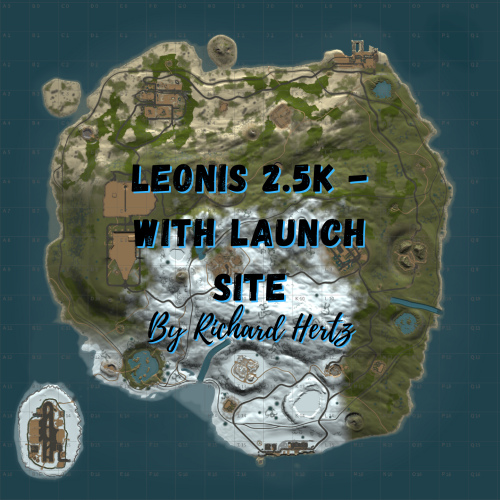 Welcome to Leonis - a 2.5K island filled with all of your favorite monuments and an above ground railway system. With rivers, caves, and plenty of space to build, players will have no problem finding a safe area to base up and stash their loot! Leonis also features a higher node count than typical procgen maps . Nodes spawn on all topology and biomes (Fields, forests, deserts, etc.) not just on cliffsides, providing a much needed increase in building materials. Your players can recover from a raid quicker or take care of upkeep in their massive compound, so that they can focus on PVPing. This is also a great way to keep players from moving on to a new server if their base is raided, since rebuilding a base can be a daunting task at times. All of my maps have one goal in common, increasing engagement and retaining players. Through trial, error, and suggestions on my own personal servers, I can confidently say that this map is perfect for up and coming servers with pop at or below 50. General Information: Map size: 2.5K Approximate prefab count: 4855 There is one custom monument included in this map. It is a Military Surplus Bridge that leads to the Airfield island. It contains multiple loot areas and diesel barrels, as well as a blue card shack, but the interior loot is well guarded by scientists. If the bridge is too difficult for some players to cross, they can also make their way to airfield through the underground tunnel system. Custom Monument included: Military Surplus Bridge Vanilla Monuments Included: Airfield Arctic Research Base Bandit Town Caves (5) Compound Desert Military Base Dome Fishing Village (3) Gas Station (2) Harbor 1 Harbor 2 HQM Quarry Ice Lake (3) Junkyard Launch Site Lighthouse (2) Large and Small Oil Rig Power Plant Satellite Dish Sewer Branch Stables A Stone Quarry Sulfur Quarry Supermarket Swamp (2) Underwater Labs Warehouse Water Well (3) Password is included with the map file. After purchase, you may edit or adjust however you see fit. To report bugs or give suggestions, feel free to message me here, or on discord any time: 𝓡𝓲𝓬𝓱𝓪𝓻𝓭 𝓗𝓮𝓻𝓽𝔃#0001$6.10
 -
View File Kingdom Royale 3700 Kingdom Royale is a 3700 custom map started as a public comission for a brand new Battle Royale server for Rust , the map is purely adapted to battle royale style of gameplay. All monuments are within reach and connected by roads from one to another , terrain is very unique and each monument has tactical placement using the terrain. All puzzle monuments have extra elite crates. Lobby island is surrounded by Invisible Colliders to prevent entering and exiting without being invited on it , we suggest using a plugin if you want to use that island for your server. If you don't want to use the island for spawns the spawn points are only on desert and temperate biome , no spawns on arctic biome or smaller islands. There are no oil rigs , no underwater laboratories or underwater loot. There are no underground tunnels , the entrances have been blocked by trash piles. Map has beem optimized to the maximum to offer your players and server the best performance. If you wish to make any changes you can do them using the password provided in the zip file or you can contact me anytime. Password comes with the map inside the "Read me" file. The map features procedural monuments ~Procedural Monuments : - Water Treatment Plant - Train Yard - Airfield - Power Plant - Launch Site - Satellite Dish - Sewer Branch - 1 Gas Stations - 1 Supermarket - Junkyard - Harbor 1 & 2 - Harbor Lobby ~ Entity Count : 7000 ~ Map Size : 3700 Password Comes with the map. Submitter Shiro Submitted 01/19/2023 Category Maps
-
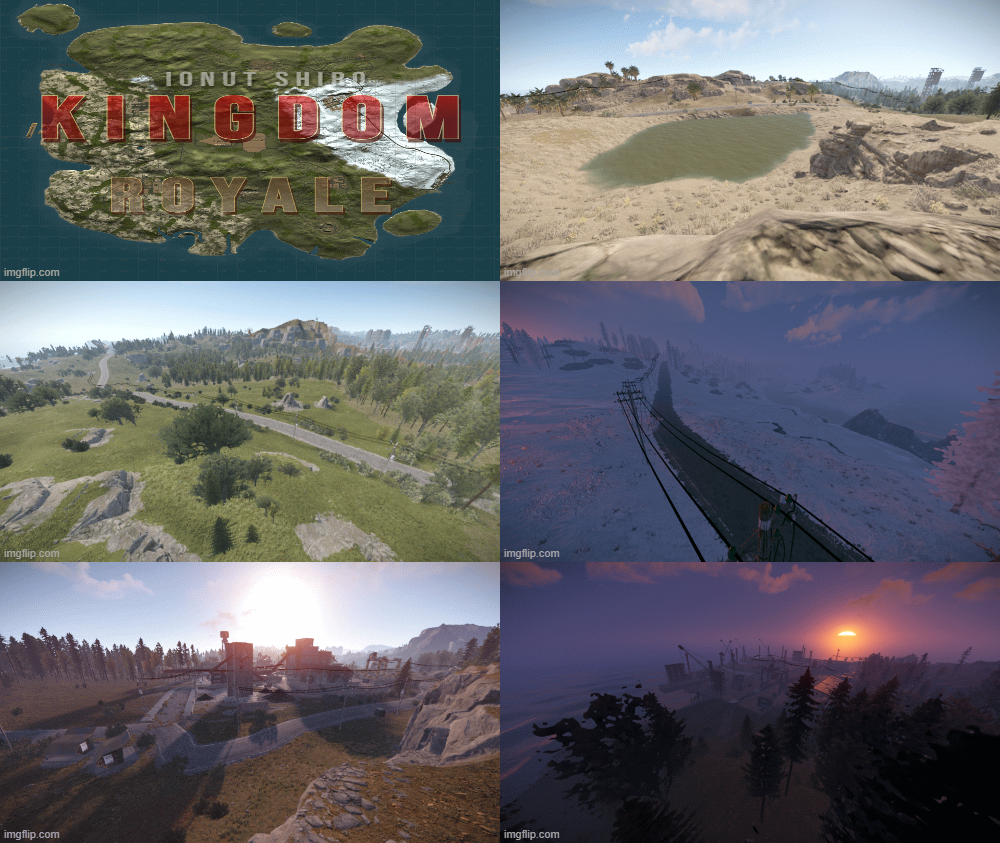 Kingdom Royale is a 3700 custom map started as a public comission for a brand new Battle Royale server for Rust , the map is purely adapted to battle royale style of gameplay. All monuments are within reach and connected by roads from one to another , terrain is very unique and each monument has tactical placement using the terrain. All puzzle monuments have extra elite crates. Lobby island is surrounded by Invisible Colliders to prevent entering and exiting without being invited on it , we suggest using a plugin if you want to use that island for your server. If you don't want to use the island for spawns the spawn points are only on desert and temperate biome , no spawns on arctic biome or smaller islands. There are no oil rigs , no underwater laboratories or underwater loot. There are no underground tunnels , the entrances have been blocked by trash piles. Map has beem optimized to the maximum to offer your players and server the best performance. If you wish to make any changes you can do them using the password provided in the zip file or you can contact me anytime. Password comes with the map inside the "Read me" file. The map features procedural monuments ~Procedural Monuments : - Water Treatment Plant - Train Yard - Airfield - Power Plant - Launch Site - Satellite Dish - Sewer Branch - 1 Gas Stations - 1 Supermarket - Junkyard - Harbor 1 & 2 - Harbor Lobby ~ Entity Count : 7000 ~ Map Size : 3700 Password Comes with the map.$10