



409 files
-
- $10
- 1 Downloads
-
AdvancedTeleport is an all-in-one teleportation system designed for modern Rust servers.
Homes, TPR, warps, outpost/bandit teleports — all wrapped in a clean UI with VIP tiers and admin tools.
Unlike basic teleporter plugins, AdvancedTeleport focuses on server control, balance, and player experience.
Features
Homes with limits, cooldowns & warmups
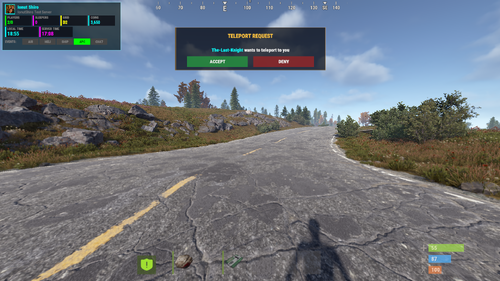
TPR request system with accept/deny UI
Customizable VIP tiers
Outpost & Bandit teleports (auto-detect OR custom coords)
Fully configurable warp locations
Daily usage limits
Combat / raid / building-blocked restrictions
Economy support: Scrap/ServerRewards/Economics
Admin panel (no config editing needed)
Auto-wipe detection resets teleport data safely
Clean, modern UI players understand instantly
Commands :
Description
/home
Open homes UI / teleport to a home
/sethome <name>
Save a home
/delhome <name>
Delete a home
/homes
Show homes UI
/tpr <player>
Request teleport to player
/tpa
Accept a TPR
/tpc
Cancel/decline pending teleport
/outpost
Teleport to Outpost (if allowed)
/bandit
Teleport to Bandit Camp
/warp <name>
Warp to location
/warps
Open warp list UI
Admin Commands :
Description
/tpadmin
Open admin GUI
/setcoord
Save coordinates during setup wizard
Permissions :
Purpose
advancedteleport.use
Basic teleport features
advancedteleport.admin
Full admin panel & tools
advancedteleport.vip1
VIP Tier 1
advancedteleport.vip2
VIP Tier 2
advancedteleport.vip3
VIP Tier 3
advancedteleport.outpost
Use Outpost teleport
advancedteleport.bandit
Use Bandit teleport
advancedteleport.warp
Use warps
Config :
{ "Request Timeout (seconds)": 30, "Teleport Sound Effect": "assets/prefabs/missions/effects/mission_victory.prefab", "Block Teleport In Combat": true, "Block Teleport When Raiding": true, "Block Teleport When Building Blocked": true, "Require TC Authorization For Home": true, "Use Economics": false, "Use ServerRewards": false, "Use Scrap": false, "Outpost Settings": { "Enabled": true, "Auto Detect Location": true, "Display Name": "Outpost", "Asset Filter (for auto-detect)": "compound", "Custom X": 0.0, "Custom Y": 0.0, "Custom Z": 0.0 }, "Bandit Camp Settings": { "Enabled": true, "Auto Detect Location": true, "Display Name": "Bandit Camp", "Asset Filter (for auto-detect)": "bandit", "Custom X": 0.0, "Custom Y": 0.0, "Custom Z": 0.0 }, "Custom Warp Locations": { "lobby": { "Enabled": true, "Display Name": "Lobby", "X": 1355.97791, "Y": 10.4623671, "Z": 567.7058, "Permission (leave empty for default warp permission)": "" } }, "Permission Tiers": { "default": { "Display Name": "Default", "Max Homes": 2, "Home Cooldown (seconds)": 300, "Home Warmup (seconds)": 10, "Home Cost": 0, "TPR Cooldown (seconds)": 300, "TPR Warmup (seconds)": 10, "TPR Cost": 0, "Daily Home Limit (-1 = unlimited)": 10, "Daily TPR Limit (-1 = unlimited)": 10, "Outpost Cooldown (seconds)": 300, "Outpost Warmup (seconds)": 10, "Outpost Cost": 0, "Bandit Cooldown (seconds)": 300, "Bandit Warmup (seconds)": 10, "Bandit Cost": 0, "Warp Cooldown (seconds)": 300, "Warp Warmup (seconds)": 10, "Warp Cost": 0, "Daily Outpost Limit (-1 = unlimited)": 5, "Daily Bandit Limit (-1 = unlimited)": 5, "Daily Warp Limit (-1 = unlimited)": 10 }, "vip1": { "Display Name": "VIP Bronze", "Max Homes": 4, "Home Cooldown (seconds)": 180, "Home Warmup (seconds)": 7, "Home Cost": 0, "TPR Cooldown (seconds)": 180, "TPR Warmup (seconds)": 7, "TPR Cost": 0, "Daily Home Limit (-1 = unlimited)": 20, "Daily TPR Limit (-1 = unlimited)": 20, "Outpost Cooldown (seconds)": 300, "Outpost Warmup (seconds)": 10, "Outpost Cost": 0, "Bandit Cooldown (seconds)": 300, "Bandit Warmup (seconds)": 10, "Bandit Cost": 0, "Warp Cooldown (seconds)": 300, "Warp Warmup (seconds)": 10, "Warp Cost": 0, "Daily Outpost Limit (-1 = unlimited)": 5, "Daily Bandit Limit (-1 = unlimited)": 5, "Daily Warp Limit (-1 = unlimited)": 10 }, "vip2": { "Display Name": "VIP Silver", "Max Homes": 6, "Home Cooldown (seconds)": 90, "Home Warmup (seconds)": 5, "Home Cost": 0, "TPR Cooldown (seconds)": 90, "TPR Warmup (seconds)": 5, "TPR Cost": 0, "Daily Home Limit (-1 = unlimited)": 35, "Daily TPR Limit (-1 = unlimited)": 35, "Outpost Cooldown (seconds)": 300, "Outpost Warmup (seconds)": 10, "Outpost Cost": 0, "Bandit Cooldown (seconds)": 300, "Bandit Warmup (seconds)": 10, "Bandit Cost": 0, "Warp Cooldown (seconds)": 300, "Warp Warmup (seconds)": 10, "Warp Cost": 0, "Daily Outpost Limit (-1 = unlimited)": 5, "Daily Bandit Limit (-1 = unlimited)": 5, "Daily Warp Limit (-1 = unlimited)": 10 }, "vip3": { "Display Name": "VIP Gold", "Max Homes": 10, "Home Cooldown (seconds)": 30, "Home Warmup (seconds)": 3, "Home Cost": 0, "TPR Cooldown (seconds)": 30, "TPR Warmup (seconds)": 3, "TPR Cost": 0, "Daily Home Limit (-1 = unlimited)": -1, "Daily TPR Limit (-1 = unlimited)": -1, "Outpost Cooldown (seconds)": 300, "Outpost Warmup (seconds)": 10, "Outpost Cost": 0, "Bandit Cooldown (seconds)": 300, "Bandit Warmup (seconds)": 10, "Bandit Cost": 0, "Warp Cooldown (seconds)": 300, "Warp Warmup (seconds)": 10, "Warp Cost": 0, "Daily Outpost Limit (-1 = unlimited)": 5, "Daily Bandit Limit (-1 = unlimited)": 5, "Daily Warp Limit (-1 = unlimited)": 10 } } }- $15
- 15 Downloads
-
Welcome Player gives your players a warm, modern first impression — without being annoying or spammy.
The plugin automatically detects whether someone is joining for the first time or coming back, then shows customized messages, optional rewards, a clean UI banner, and (if you want) sends notifications straight to Discord. It also tracks connection history, so players can check when they first joined and how often they’ve played.
What it does ?
Detects first-time vs returning players
Sends configurable private messages, global join messages (optional), and disconnect messages
Gives custom rewards (with skin support)
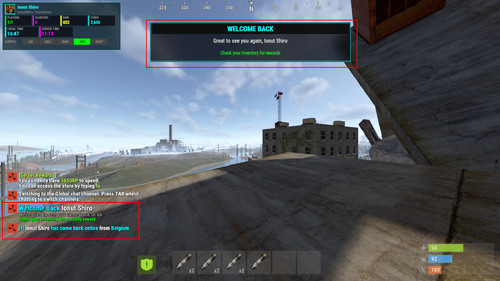
Displays a subtle, polished UI welcome banner
Detects player country (with fallback)
Sends Discord webhook embeds for joins and disconnects
Tracks basic player stats (first join, last join, total connects)
Integrates with BetterChat if installed
Supports multiple languages using Oxide lang
And yes — everything can be turned on or off.
Examples (default behavior)
First time player joins → welcome message, optional starter reward, UI banner, optional Discord notification
Returning player joins → short “welcome back” message, optional loyalty reward
Player disconnects → optional global message + Discord embed
Player runs /welcomestats → sees their join history + country + total connections
Permissions :
welcomeplayer.bypass - Skips all welcome events — useful for admins and test accounts.
Commands :
/welcomestats sees their join history + country + total connections
welcomeplayer.reset <steamid|all> - Console Command
welcomeplayer.stats - Console Command
Config :
{ "First Time Player Settings": { "Enable First Time Welcome": true, "Send Global Message": true, "Private Message": "<size=18><color=#00ffff>Welcome</color> <color=#FFFFFF>{player}</color> to <color=#ff00ff>{server}</color></size>\n<size=14><color=#888888>It seems like this is your <color=#00ffff>first time</color> joining us</color></size>\n<size=12><color=#00ff00>Check your inventory for a welcome gift</color></size>", "Global Message": "<size=14><color=#00ff00>[+]</color> <color=#FFFFFF>{player}</color> <color=#00ff00>has joined us for the first time</color> from <color=#00ffff>{country}</color></size>", "Sound Effect": "assets/bundled/prefabs/fx/invite_notice.prefab", "Rewards (shortname:amount:skinId)": [ "syringe.medical:3:0", "bandage:5:0", "apple:10:0", "syringe.medical:3:0", "bandage:5:0", "apple:10:0" ], "Message Display Duration (seconds)": 10.0 }, "Returning Player Settings": { "Enable Returning Player Welcome": true, "Send Global Message": true, "Private Message": "<size=18><color=#00ffff>Welcome Back</color> <color=#FFFFFF>{player}</color></size>\n<size=14><color=#888888>We're glad to see you came back to us</color></size>\n<size=12><color=#00ff00>Check your inventory for a loyalty reward</color></size>", "Global Message": "<size=14><color=#00ffff>[+]</color> <color=#FFFFFF>{player}</color> <color=#00ffff>has come back online</color> from <color=#00ffff>{country}</color></size>", "Sound Effect": "assets/bundled/prefabs/fx/notice/loot.copy.fx.prefab", "Rewards (shortname:amount:skinId)": [ "syringe.medical:1:0", "syringe.medical:1:0" ], "Message Display Duration (seconds)": 8.0 }, "Disconnect Settings": { "Enable Disconnect Message": true, "Send Global Message": true, "Global Message": "<size=14><color=#ff00ff>[-]</color> <color=#FFFFFF>{player}</color> <color=#ff00ff>just went offline</color></size>" }, "General Settings": { "Server Name (leave empty to use server hostname)": "", "Use IP-API for Country Detection": true, "Default Country (if detection fails)": "Unknown", "Welcome Delay (seconds after connect)": 2.0, "Show UI Welcome Banner": true, "UI Banner Duration (seconds)": 8.0, "Log Player Connections": true }, "Discord Webhook Settings": { "Enable Discord Webhooks": false, "Webhook URL": "", "Embed Color - First Time (decimal)": 65280, "Embed Color - Returning (decimal)": 65535, "Embed Color - Disconnect (decimal)": 16711935, "Send First Time Join": true, "First Time Message": ":green_circle: **{player}** has joined for the first time from **{country}**", "Send Returning Player Join": true, "Returning Message": ":blue_circle: **{player}** has come back online from **{country}**", "Send Disconnect": true, "Disconnect Message": ":red_circle: **{player}** just went offline", "Include Player Steam ID": true, "Include Timestamp": true } }- $5
- 6 Downloads
-
Latvia Custom Map was made after the shape of Latvia for a friend of mine and we decided to make it public , it has procedural monuments spread across the map and few additions on the roadside including a hidden cave in the mountains with a procedural Water Treatment Plant inside it + several scientist spawns guarding 2 locked crates in the mysterious fog , cave is being locked behind a red key card door yet still accessible via subway entrance .
What makes this map special is obviously the shape and terrain of it and Bradley will roam Power Plant inside and the road surrounding it.
Map contains 3 bradley paths
1 at launch site by default
1 at airfield custom
1 at powerplant
Procedural Monuments :
Giant Excavator Pit Satellite Dishn Launch Site Military Tunnel Arctic Research Basen Power Plant Water Treatment Plant with abit of extra in an unique location
Abandoned Military Base Sewer Branch The Dome Airfield Large harbor Junkyard The usual gas stations , spermekts , quarries , caves , swamps and icelakes , barns , fishing villages and mining outposts spread across. The map does not have Outpost or Bandit Camp but it has a custom safezone including vending machines from both bandit camp and outpost + the airwolf vendor in an unique spot , on the map you can find plenty of good base building spots or just for sightseeing! Bradleys can be removed on demand if you use a plugin for them or you just don't want them at all. Map has been optimized even for the players with low spec computers to ensure quality and pleasure while playing on it Entity count is 12118 Map size : 4000- $15
- 2 Downloads
-
Procedural 2500 size map edited with large monuments and above ground railway network
The railway network above ground passes by all the monuments and follows the road, it is not a loop.
Procedural Monuments :
Launch Site
Ferry Terminal
Military tunnel
Missile Silo
Sewer Branch
Outpost with bandit camp helicopter vendor and gambling area
Fishing Villages
Warehouse
Caves
Swamps
Oil rigs
Gas Station
Lighthouses
Stables
Quarries.
Map Size : 2500
Entity Count : 2025
- $8
-
Procedural 2500 size map edited with large monuments and above ground railway network
The railway network above ground passes by all the monuments and is a loop.
Procedural Monuments :
Launch Site
Outpost with bandit airwolf vendor + gambling area
Large harbor
Dome
Missile Silo
Ferry Terminal
Sewer Branch
Fishing Villages
Swamps
Caves
Underwater Lab
Oil Rigs
Lighthouses
Stables
Quarries
Gas Station
Warehouse
Map Size : 2500
Entity Count : 4464
- $8
- 2 Downloads
-
Procedural 2500 size map edited with large monuments and above ground railway network
The railway network above ground passes by all the monuments and is a loop.
Procedural Monuments :
Launch Site
Outpost with bandit airwolf vendor + gambling area
Airfield
Large Harbor
Ferry Terminal
Sewer Branch
Desert Mil Base
Fishing Villages
Swamps
Supermarket
Warehouse
Caves
Oil Rigs
Underwater Lab
Lighthouses
Quarries
Stables
Map Size : 2500
Entity Count : 2148
- $8
-
Procedural 2500 size map edited with large monuments and above ground railway network
The railway network above ground passes by all the monuments and follows the road, it is a loop.
Procedural Monuments :
Ferry Terminal
Small & Large Harbor
Fishing Villages
Desert Mil Base
Outpost + Airwolf Vendor + Gambling
Launch Site
Train Yard
Junkyard
Missile Silo
Dome
Satellite Dish
Power Plant
Quarries
Swamps
Gas Stations & Supermarkets & Mining Outposts
Caves
Underwater Labs
Oil Rig Small & Large
Lighthouse
Map Size : 2500
Entity Count : 3685
- $8
- 2 Downloads
-
Procedural 2500 size map edited with large monuments and above ground railway network
The railway network above ground passes by all the monuments and follows the road, it is a loop.
Procedural Monuments :
Ferry Terminal
Harbor Large & Small
Fishing Villages
Desert Mil Base
Outpost + Airwolf Vendor + Gambling
Launch Site
Train Yard
Nuclear Silo
Junkyard
Dome
Quarries
Swamps
Gas Stations & Mining Outpost
Caves
Oil Rig Large & Small
Lighthouse
Underwater Labs
Map Size : 2500
Entity Count : 3062
- $8
- 1 Downloads
-
Procedural 3000 size map edited with large monuments and above ground railway network
The railway network above ground passes by all the monuments and follows the road, it is a loop and connected with underground system .
Procedural Monuments :
Ferry Terminal
Large & Small Harbor
Fishing Villages
Desert Mil Base
Outpost + Airwolf Vendor + Gambling
Launch Site
Military Tunnel
Train Yard
Nuclear Missile Silo
Junkyard
Satellite Dish
Sphere Tank
Power Plant
Water Treatment Plant
Stables
Quarries
Swamps
Ice Lakes
Gas Stations , warehouses , Supermarkets
Caves
Oil Rigs and Lighthouses
- $8
- 1 Downloads