
Shiro
Administrator
-
Joined
-
Last visited
Files posted by Shiro
-
Santas workshop comes with a custom Snowman Recycler. You enter the workshop with a red door. NPC's inside. Lots of loot in and around the property. Entity count 712.
- $3.99
- 2 Downloads
-
Entity count: 253 This is a small prefab with various loot around it. No NPCs placed in rust edit since they just run off. There is a plugin on Umod called "Better Scarecrows" that works great tho. I use this on my server to place around. Or you can add your own NPC's through another plugin.
- $1.99
- 5 Downloads
-
Entity count: 618 No NPC's included. When placing them with Rust Edit they tend to run off or dont act right. I highly suggest you try a plugin such as Better NPC, works amazing once you get it set up for prefabs like this. There is a /sil picture inside (you will need sign artist). I did place a barrier over to keep players from taking the pic. While in game an admin would need to hover at the very top to use /sil to add the pic. This is put in place like this to prevent players from removing the frame. There is plenty of loot inside. Takes a green card to get inside and a fuse. There are low volume damage colliders placed near steam so when the player walks through the steam areas they will take very minimal damage to there health. The electric, switches, timers, etc set up to give the player a little harder time getting through it. There are fake buttons, sequenced timers you must use to get through so beware, all the electric works and has been tested but switches are hidden behind loot that they will need to hit to get to the next area of the prefab to make it more challenging is all. Any questions you can always reach out to me. Hope everyone will enjoy this prefab for Halloween and bring some spookiness to their servers!
- $3.99
- 3 Downloads
-
Simple plugin that protects player's crops from being stolen by checking if the player is authorized on the TC!
Permissions:
privatecrops.message.bypass privatecrops.protection.bypass Language:
{ "message": "<color=red>You are not allowed to steal other players crops!</color>" }- Free
- 23 Downloads
- 1 Comments
-
Blocks the use of certain tools on gather of flesh, trees, ore!
Permissions:
toolblocker.bypass Configuration:
{ "corpses": [ "knife.bone", "knife.combat" ], "nodes": [ "stone.pickaxe", "pickaxe", "icepick.salvaged" ], "trees": [ "stonehatchet", "hatchet", "axe.salvaged" ] } Language:
{ "Blocked": "You are not allowed to use a {0} to gather {1}!" }- Free
- 4 Downloads
-
Have you ever had players steel from other players horses and cant just catch em? This plugin logs items being taken and added to a horses storage, so you can catch horse looters!
Permissions:
horselogger.use Commands:
/horseid - While looking at a horse, it returns the horses ID which would be used to find the log file!- Free
- 7 Downloads
-
Want to make your server a tad bit more realistic, welcome StationaryCrafting, it makes it so players can only craft if they are next to a workbench, if not crafting is not possible or cancels out...
Permission:
stationarycrafting.use Configuration:
{ "ShowMessages": false } Localization:
{ "inofrange": "Stay in the workbench radius, or your crafting queue will be canceled!", "outofrange": "You cannot craft if you are not in the workbench radius!", "canceled": "You have left the workbench radius so your crafting queue was canceled!" }
- Free
- 9 Downloads
-
Allows you to link the effects plugin https://weoxide.net/index.php?/file/275-effects/ with the https://codefling.com/plugins/cooking so when you eat a certain food, you can run effects like vomit! Modify the config to the recopies.
Notes:
Effects: Vomit, Blur, Lick, Breathe, Shake Configuration:
{ "Recipes": { "hamburger": { "vomit": { "Enabled": true, "InstantEffect": true, "LengthIsBuffDuration": true, "EffectLengthInSeconds": 60, "EffectInterval": 3.0 }, "lick": { "Enabled": true, "InstantEffect": true, "LengthIsBuffDuration": true, "EffectLengthInSeconds": 60, "EffectInterval": 4.0 }, "breathe": { "Enabled": true, "InstantEffect": true, "LengthIsBuffDuration": true, "EffectLengthInSeconds": 60, "EffectInterval": 2.0 }, "shake": { "Enabled": true, "InstantEffect": true, "LengthIsBuffDuration": true, "EffectLengthInSeconds": 60, "EffectInterval": 3.0 }, "blur": { "Enabled": true, "InstantEffect": true, "LengthIsBuffDuration": true, "EnableFlashing": true, "StaticBlurOpacity": 0.5, "FlashingBlurOpacity": 0.3, "EffectLengthInSeconds": 60, "EffectInterval": 0.5 } } } }
- Free
- 0 Downloads
-
Ever wanted to know how many sleepers are on your server? With this plugin u can!
Permissions:
sleepercount.use - Gives the player access to the command! Commands:
/sleepers - Returns the total number of sleepers that are in the server! Localization:
{ "none": "There are currently no sleepers on the server!", "single": "There is {0} sleeping player!", "multiple": "There are {0} sleeping players!", "denied": "You don't have permission to use that command!" }- Free
- 13 Downloads
-
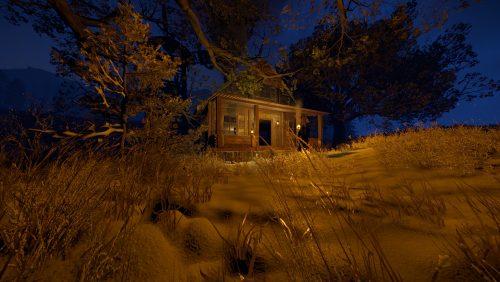
A small cozy hand made winter cabin with a hidden underground shelter behind the bookshelf and spacious attic to spend your cold winter in peace!nIt comes with height mask , splat mask , biome mask, alpha mask and topology mask.
Entity Count : 245
To use this on your map copy the files from "Custom Prefabs" folder into your "CustomPrefabs" folder in RustEdit directory and after that you can see your new prefab in the Custom Prefabs list in Rust Edit.
- $3.50
- 7 Downloads
-
A custom garage-junkyard combined with a green and red key-card puzzle.
Basement holds 1 green crate + 3 Construction Crates + 1 Tool Crate and 9 oil barrels
Office holds 2 elite crates and 1 hackable crate fuse for office can be found in the toilet.
In the parking a Magnetic Crane can be found with a shredder and a few shreddable cars which respawn . Crane and shredder works the same way like vanilla Junkyard , pop the fuel , hop in , pickup the cars and get the loot.
~Monument comes with Alpha , Biome , Height , Splat and Topology masks.
~To use this on your map copy the files from "Custom Prefabs" folder into your "CustomPrefabs" folder in RustEdit directory and after that you can see your new prefab in the Custom Prefabs list in Rust Edit.
~Entity Count : 856
- $8.50
- 2 Downloads
-
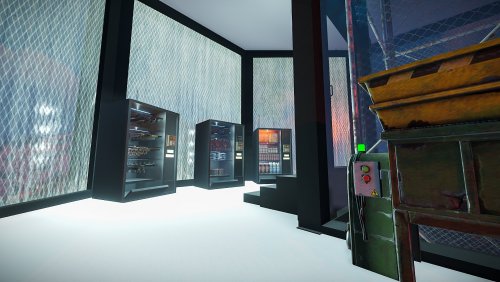
Custom and modern looking vending machines that can be used just like normal vending machines they come with all the necessities to make them work properly like any other vending machine.
Vending presets are provided with the file if you wish to edit the items put on sale.
Entity Count :
Guns Vending Machine : 257
Clothing Vending Machine: 294
Snacks Vending Machine : 300
To install and use those vending machines copy the files from "Custom Prefabs" and "Vending Presets" and paste them into your "CustomPrefabs" and "VendingPresets" folders in your RustEdit Directory and you are good to go!
- $3.50
- 6 Downloads
-
A modern styled PVE prefab that can be used for Roleplay purposes and not only .
It comes with height mask , splat mask , biome mask and topology mask.
It comes mostly empty due the fact that most people in my experience preffer to furnish them themselves than have them already furnished if requested it can be furnished.
~Car from the pictures is not provided ~
Entity Count : 1089
To use this on your map copy the files from "Custom Prefabs" folder into your "CustomPrefabs" folder in RustEdit directory and after that you can see your new prefab in the Custom Prefabs list in Rust Edit.
- $10
- 9 Downloads
-
A custom swamp made for building purpouses , not a monument , no loot inside it.
The mysterious swamp has a hidden rabbit hole that will lead you to a massive underground cave system with space for building , you can find down there a hobo barrel and a recycler!
It comes with height mask , splat mask , biome mask, alpha mask and topology mask.
Entity Count : 150
To use this on your map copy the files into your "CustomPrefabs" folder in RustEdit directory and after that you can see your new prefab in the Custom Prefabs list in Rust Edit.
- $3.50
- 4 Downloads
-
A custom lighthouse with a apocalyptic themed reconstruction and additions.
Entity Count : 204
- $3
- 3 Downloads
- 1 Comments
-
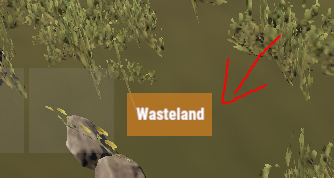
Simple plugin that shows a small UI indicating what zone you are in, It is highly configurable and easy!
Notes:
ZoneManager is required! The text of the zone would be configured in the zonemanager plugins datafile under the name parameter! AlwaysShow - Means that the UI will always be shown weather there is a zone or not! UseWhitelist - True means that it will only show zones that are in the Whitelist! ZoneUISettings - Allows you to add custom UI settings for a zone, If there is none for that zone it results back to the default setting! Permissions:
zoneindicator.use - Shows the UI zoneindicator.import - Allows that player to run the command zindicator_import! Commands:
/zindicator_import - Imports all your zones from ZoneManager Configuration:
{ "AlwaysShow": true, "TextPlaceholder": "Wasteland", "DefaultUI": { "AnchorMin": "0.5 0", "AnchorMax": "0.5 0", "OffsetMin": "190 30", "OffsetMax": "250 60", "FadeSpeed": 0.25, "Color_Background": "0.8 0.5 0.1 0.8", "Color_Text": "1 1 1 1", "TextSize": 12 }, "UseWhitelist": false, "Whitelist": [ "11423859", "25094303" ], "ZoneUISettings": { "11423859": { "AnchorMin": "0.5 0", "AnchorMax": "0.5 0", "OffsetMin": "190 30", "OffsetMax": "250 60", "FadeSpeed": 0.25, "Color_Background": "0.8 0.5 0.1 0.8", "Color_Text": "1 1 1 1", "TextSize": 12 }, "25094303": { "AnchorMin": "0.5 0", "AnchorMax": "0.5 0", "OffsetMin": "190 30", "OffsetMax": "250 60", "FadeSpeed": 0.25, "Color_Background": "0.8 0.5 0.1 0.8", "Color_Text": "1 1 1 1", "TextSize": 12 } } }
- $10
- 7 Downloads
-
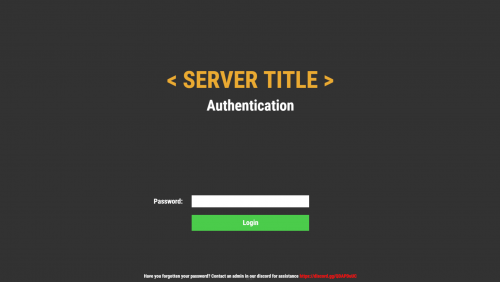
Simple but beautiful user authentication system! Protect your players with a simple authentication system. A password comes a long way! Use a database or local datafile, as it is up to you! With so many features and options to customize! I guarantee you would be satisfied!
Note:
Passwords are now SHA256 Hashed, I have decided to not salt the hashes for the simple reason, if the server or database was breached, the hacker would have access to the salt one way or another, and once they have the salt its pointless! I was thinking of using the players steamid as salt but again, a hacker is not that dumb to not take a look at the plugin to figure it out.
Database table will auto generate if it does not exist!
["UI", "Input", "Secure"] Show/Hide password in the input field
IPAutoAuth - if you logged in previously by the same ip, the login screen will not show up! KeepAuthOnDisconnect overrides if enabled!
Permissions:
userauth.bypass - Bypass the authentication/registration process!
userauth.resetpass - Permission to use the command /resetpass
userauth.movementbypass - Bypass movement lock!
Commands:
/resetpass <steamid> - Resets the given players password, if they are connected registration process would initialize!
Configuration:
{ "DB": { "DB_Host": "localhost", "DB_Name": "userauth", "DB_Password": "", "DB_Port": "3306", "DB_Username": "root", "UseDatabase": false }, "Freeze": { "DisableChat": true, "DisableChatCommands": true, "DisableConsoleCommands": true, "DisableMovement": true, "DisableVoice": true }, "IPAutoAuth": false, "KeepAuthOnDisconnect": false, "Kick": { "Enable_FailedLoginKick": true, "Enable_TimedKick": true, "FailedLoginKickTimes": 3, "TimedKickInSeconds": 60 }, "UI": { "Background_Color": "0.2 0.2 0.2 1", "Button": { "Background_Color": "0.3 0.8 0.3 1", "Text_Color": "1 1 1 1", "Text_Size": 18 }, "Footer": { "Text_Color": "1 1 1 1", "Text_Size": 12 }, "Header": { "Text_Color": "1 1 1 1", "Text_Size": 38 }, "Input": { "Max_Length": 32, "Secure": true }, "Title": { "Text_Color": "0.92 0.67 0.2 1", "Text_Size": 60 } } }
Language:
{ "UI_Title": "< SERVER TITLE >", "UI_Authentication_Header": "Authentication", "UI_Authentication_Button": "Login", "UI_Authentication_Footer": "Have you forgotten your password? Contact an admin in our discord for assistance <color=red>https://discord.gg/QDAPDuUC</color>", "UI_Registration_Header": "Registration", "UI_Registration_Button": "Register", "UI_Registration_Footer": "Do you need some assistance? Contact an admin in our discord for assistance <color=red>https://discord.gg/QDAPDuUC</color>", "Authentication_Kick_Reason": "You did not login in time!", "Registration_Kick_Reason": "You did not register in time!", "Failed_Login_Reason": "You have entered your password wrong a number of times!", "Error_UI_Bad_Password": "Please try again, You have {0} tries left!", "Error_UI_Empty_Password": "No password was provided, please enter a password!", "NoInput": "No input was provided!", "ParseError": "Could not parse input, try again!", "CommandComplete": "Command has been executed successfully!" }
Planned features:
Ability to change password!
Ability to lock registrations!
Ability to protect players when they are locked! "Godmode"
Command whitelist!
Little text recommending that people use a secure/unique password
- $20
- 4 Downloads
-
Run effects on players or yourself! The plugins is primarily used as an API for other plugins like https://weoxide.net/index.php?/file/274-cookingeffectswrapper/
If you want other effects, message me and i can add them :)
Permissions:
effects.use Commands:
/vomit <optional playername> /blur <optional playername> /shake <optional playername> /breathe <optional playername> /lick <optional playername> /killeffects <optional playername> Config:
{ "Effects": { "vomit": { "Enabled": true, "InstantEffect": true, "EffectLengthInSeconds": 60, "EffectInterval": 6 }, "lick": { "Enabled": true, "InstantEffect": true, "EffectLengthInSeconds": 60, "EffectInterval": 6 }, "breathe": { "Enabled": true, "InstantEffect": true, "EffectLengthInSeconds": 60, "EffectInterval": 6 }, "shake": { "Enabled": true, "InstantEffect": true, "EffectLengthInSeconds": 60, "EffectInterval": 6 }, "blur": { "Enabled": true, "InstantEffect": true, "EnableFlashing": true, "StaticBlurOpacity": 0.5, "FlashingBlurOpacity": 0.3, "EffectLengthInSeconds": 60, "EffectInterval": 6 } } } Hooks:
void EffectVomit(BasePlayer Player, int Length, float Interval, bool Instant) void EffectShake(BasePlayer Player, int Length, float Interval, bool Instant) void EffectBlur(BasePlayer Player, int Length, float Interval, bool Instant, bool Flashing) void EffectLick(BasePlayer Player, int Length, float Interval, bool Instant) void EffectBreathe(BasePlayer Player, int Length, float Interval, bool Instant)- $10
-
Make custom commands, custom crafts, etc! Enter a command and it checks if you got the stuff and the correct amount and executes the configured command!
Notes:
If Permission or Message is not set aka "" then they will be skipped! Configuration:
{ "Commands": { "firebullets": { "ExecuteCommand": "giveto {1} ammo.rifle.incendiary 64", "Permission": "firebullets", "Message": "Enjoy the fire bullets!", "TakeItems": true, "Items": [ { "Shortname": "ammo.rifle", "Amount": 64 }, { "Shortname": "lowgradefuel", "Amount": 32 } ] } } }
- $5
- 2 Downloads
-
Magic Poncho is an item with a custom skin and additional abilities to farm more resources in the game.
Poncho is slightly visible in the dark.
The plugin provides the ability to customize which item needs to be increased when collecting or farming resources.
The plugin provides the ability to smelt the extracted resources.
Ponchos can be repaired because ponchos lose their durability when farmed.
The plugin provides the ability to craft a poncho.
It is possible to issue an item through the server console, a command in the chat, or through another plugin.
In order for players to find the item, there are settings for item spawning in loot boxes.
Permission Smelting = magicponcho.smelting
Permission Craft=magicponcho.craft
chat command.
Enable/disable smelting = smelting
Item craft=craftponcho
console command.
Give item to player = giveponcho SteamID
To issue a poncho through another plugin, use.
Identifier item skin = 2806678960
Item shortname = attire.hide.poncho
Item name = Magic military poncho
Default config file.
{ "Global settings": { "Item name": "Magic militari poncho", "How fast the item breaks (by default, the item has 250 HP)": 1.0, "Enable smelting of mined resources": false, "Enable crafting poncho": false, "Enable spawn for poncho in loot boxes": false }, "Multiplier settings": { "Item list (item shortname : multiplier)": { "wood": 2.0, "stones": 2.0, "sulfur.ore": 2.0, "metal.ore": 2.0, "hq.metal.ore": 2.0, "leather": 2.0, "bone.fragments": 2.0, "fat.animal": 2.0, "cloth": 2.0, "bearmeat": 2.0, "meat.boar": 2.0, "horsemeat.raw": 2.0, "deermeat.raw": 2.0, "wolfmeat.raw": 2.0, "chicken.raw": 2.0, "cactusflesh": 2.0, "mushroom": 2.0, "potato": 2.0, "seed.potato": 2.0, "seed.hemp": 2.0, "pumpkin": 2.0, "seed.pumpkin": 2.0, "corn": 2.0, "seed.corn": 2.0, "yellow.berry": 2.0, "seed.yellow.berry": 2.0, "green.berry": 2.0, "seed.green.berry": 2.0, "red.berry": 2.0, "seed.red.berry": 2.0, "blue.berry": 2.0, "seed.blue.berry": 2.0, "black.berry": 2.0, "seed.black.berry": 2.0, "white.berry": 2.0, "seed.white.berry": 2.0 } }, "Crafting settings": { "Cost of manufacturing poncho": { "scrap": 250, "leather": 10, "sewingkit": 1 } }, "Spawn settings": { "What crates can contain ponchos (item shortname : chance drop)": { "bradley_crate": 25, "heli_crate": 25 } } }
- $3
- 1 Downloads
-
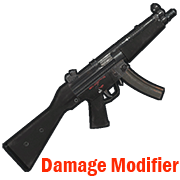
Modifies the damage from your weapon.
Permission = "weapondamagemodifier.use";
Some weapons have already been added to the config file for example.
You can edit the list to your liking by adding or removing weapons from the list.
How to find out the shortname of a weapon?
Enable debugging in the config file.
"Default: what weapon the player is using, what damage was received from this weapon.": true,
"Modifier: what weapon the player is using, what damage was received from this weapon.": true
Reload the plugin.
Choose an active weapon for your character, and deal damage to the entity.
Information will be displayed to you in the server console.
"Hit Info (Initiator - who did the damage). Weapon (ShortName - what weapon). Damage (Total - what was the damage)."
Copy the name of the weapon and add it to the list in your config file.
Save the config file.
Reload the plugin.
Default config file.
{ "Debag settings": { "Default: what weapon the player is using, what damage was received from this weapon.": true, "Modifier: what weapon the player is using, what damage was received from this weapon.": true }, "Multiplier settings": { "Weapon list (weapon shortname : multiplier)": { "explosive.timed.deployed": 1.0, "explosive.satchel.deployed": 1.0, "grenade.beancan.deployed": 1.0, "grenade.f1.deployed": 1.0, "rocket_basic": 1.0, "rocket_hv": 1.0, "rocket_fire": 1.0, "mp5.entity": 1.0, "thompson.entity": 1.0, "m92.entity": 1.0, "bolt_rifle.entity": 1.0, "l96.entity": 1.0, "m39.entity": 1.0 } } }
- $2
- 10 Downloads
-
Connecting to your server using the specified Steam ID.
Good for testing a server, or for a group of friends who need privacy.
Just add a Steam ID to the config file and you will be able to connect to the server.
Default config file.
{ "Connect [SteamID]": [ "*****************", "*****************" ] }
- Free
- 13 Downloads
-
Maybe someday you need to cure your horse?
Then this plugin is for you.
Take the medical syringe and walk close to the horse and press the right mouse button.
1 medical syringe will restore 25 HP for a horse.
Permission "horsetreatment.use"
Configuration file.
{ "Settings": { "Horse Life Recovery Quantity.": 25.0 } }
- Free
- 16 Downloads
-
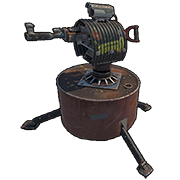
Plugin to block specific weapons or ammo in the auto turret
To bypass the blocking, it is provided. Permission = "turretblocked.bypassblocked"
Configuration file.
{ "Prohibited weapon.": [ "lmg.m249", "rifle.l96", "rifle.m39", "rifle.ak", "rifle.lr300", "rifle.bolt", "rifle.semiauto" ], "Prohibited ammunition.": [ "ammo.rifle.explosive", "ammo.rifle.incendiary", "ammo.rifle.hv", "ammo.rifle" ] }
- Free
- 4 Downloads